News
Effects of Winter on Tesla Battery Range and Regen

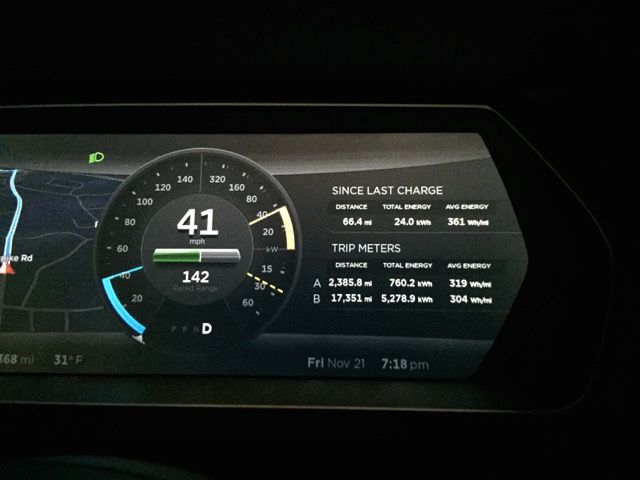
Winter conditions has begun to set in here in New England with temperatures not exceeding the 20’s. Thankfully I’ve already prepared my winter wheels and tires in advance so I’m not overly worried about the potential for snow, however I’m quickly learning the effects of winter on the battery and overall energy efficiency.
Cabin Temperature
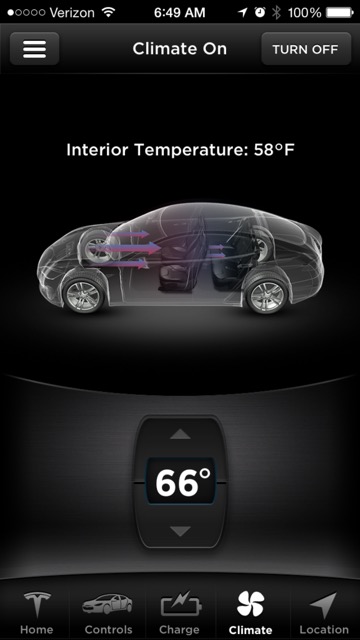
Preheating the cabin temperature through the mobile Tesla Motors app.
The first order of business is making sure I’m comfortable when I get into the car each day. This means preheating the Model S cabin temperature through the Tesla App (if I happen to remember to) or, better yet, have it scheduled to automatically preheat via the VisibleTesla app.
My daily schedule looks something like this: VisibleTesla preheats the car 30 minutes before I enter and while it’s still plugged in from my overnight charge. This ensures I enter a warm car every morning with no affect on my range – the best of both worlds!
Leaving for work at the end of the day, however, is a bit more erratic so I usually use the Tesla App to preheat on an ad-hoc basis. I realize that this preheating will eat into my overall battery range, but I’m not overly concerned because I have plenty of range to spare even with a 100 mile commute each day. It’s well worth it for a little more comfort.
I enjoy turning on the air conditioner during the summer months but getting into a warm car in the dead of winter is even better!
Limited Regenerative Braking
Prior to the winter, the only times I have experienced limited regenerative braking (regen) was directly after performing range charges in anticipations of my Tesla road trip adventures. The Tesla battery does not have the capacity to receive additional energy (when at a 100% state of charge) thus it disables regenerative braking all together.
 Winter months, however, bring a completely different experience with regen. When the Model S is cold it limits the ability to regen since the batteries need to be at an optimal temperature before it receives any additional charge.
A dashed yellow line appears on the center display indicating that regenerative braking is limited. If you’ve been accustomed to driving with regen on, this new behaviour (with regen disabled) will feel and drive very differently.
I found myself quickly rolling towards the cars in front of me as I instinctively ignored the brakes and assumed that the car would just come to a gradual stop by letting go of the accelerator pedal. That obviously didn’t happen with regen limited. You’ll need to use your brakes so be careful not to “over press” it as you quickly adjust to driving with brakes again.
This winter-induced form of limited regeneration lasts for a very long. I wasn’t sure if the lack of regen was isolated to the weather conditions for that particular day so I decided to log my results over a larger sample of several days.
Here’s what I noticed about the effects of winter on Tesla’s regenerative braking:
- There appears to be a linear easing off of the “regen cap” through the first 30 minutes. At 0 miles, when the car is just started, the amount of regen is capped at 20 kW.
- 25 minutes into my drive, the regen cap is loosened to 40 kW.
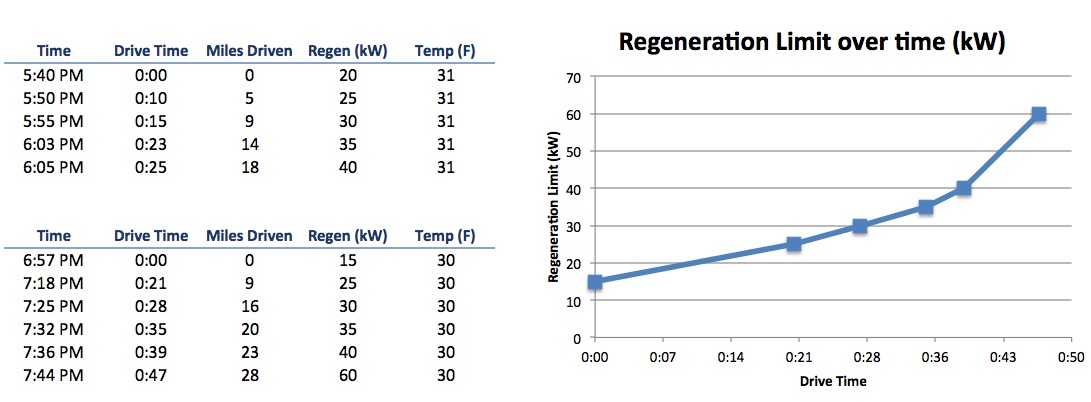
Graph depicting the amount of energy that can be regained through regen over time.
As you can see from some of my data points, it took me over 45 minutes of driving (30 miles covered) before the regenerative braking behavior was back to normal — that’s almost my entire drive home!
I’ve been experimenting with various approaches to avoid the regen capping. One of which is timing my overnight charge so that it completes right at the time I’m about to leave for work. This ensures that the batteries are at a good temperature, by the time I begin driving, and with no regen cap in place. Timing it perfectly can be tricky.There’s been a few occasions where my charge completed earlier than expected and as a result the batteries cooled off before I got to drive.Here again VisibleTesla can help, but it’s an area that I wish Tesla would address directly —
add a feature to allow users to specify the END time for a charge as opposed to the start time. The Model S should calculate when charging begins based on the set end time.
I’ve been experimenting with ways to reduce the after-work limited regenerative braking occurrences but since there’s no charging infrastructure at my work, I can’t pre-warm the batteries. I’ve even tried warming up the cabin temperature in advance to see if this would have an impact on regenerative braking but unfortunately it doesn’t.
Higher Energy Use
Cold weather definitely affects energy use on the Model S. My tires, while great for winter, are less efficient — they’re not the low rolling resistance tires that came with the Model S. I’m also using extra energy for warming the cabin (despite my chilly 66 F year-round cabin temperature setting). The Model S is also using extra power when managing the battery temperature.
Prior to winter my average energy consumption was around 300-315 kWh/mi but now I’m averaging 350-365 kWh/mi or approximately 16% more energy used than summer months. I’m also using my brakes more during the winter, as a result of the limited regenerative braking, so that will also introduce more wear and tear.
One piece of advice from Tesla is to use seat heaters to warm yourself up over cabin heat. The seat heaters apply heat directly to your body and thus a more efficient use of energy. If you have your cabin temperature set at 72 F , try reducing it to 68 F and use your seat heaters to warm yourself up.
I’m sure I’ll be uncovering a lot more tips and interesting findings over the next few months especially as the snow storms start blowing in and temperatures dip into single digits! Stay tuned!


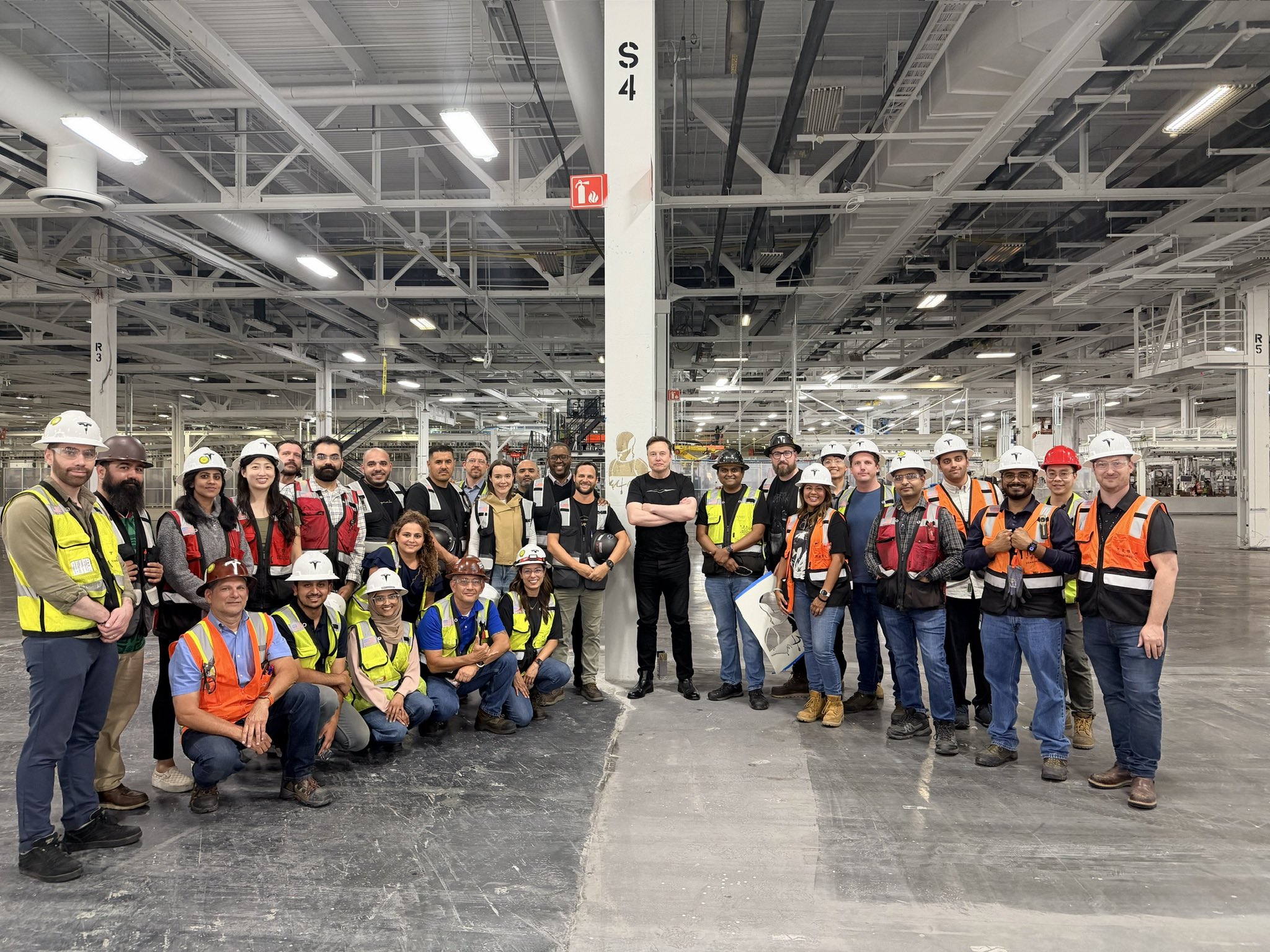
Tesla CEO Elon Musk posted a photo of himself standing with the Optimus production team inside Tesla’s Fremont factory, arms crossed amid workers in hard hats and safety vests. The image captures a pivotal industrial shift: the same facility space once dedicated to building Tesla’s flagship Model S sedan and Model X SUV is now home to the company’s humanoid robot manufacturing line.
Walking the Optimus production line in Fremont pic.twitter.com/ABS0tuRibW
— Elon Musk (@elonmusk) July 1, 2026
Tesla’s Fremont Factory, acquired in 2010 from the former NUMMI joint venture between Toyota and GM, has been the company’s original U.S. manufacturing hub since Model S production began in 2012.
The Model X followed soon thereafter. These premium vehicles offered lower annual volumes, recently around 30,000 combined, compared to the high-volume Model 3 and Model Y lines that continue around the site. Over their combined run, the S and X accounted for roughly 610,000 units.
In late January 2026, during Tesla’s Q4 2025 earnings call, Elon Musk announced the end of Model S and Model X production in Q2 2026. The final vehicles rolled off the line in early May. Rather than retooling for another vehicle, Tesla chose to convert the dedicated S/X assembly area into a dedicated Optimus Gen 3 production line.
Model 3 and Y manufacturing remains unaffected. Tesla’s official Fremont Factory page now lists Optimus alongside the 3 and Y as core products.
The conversion was executed with remarkable speed. After production stopped, crews dismantled the existing vehicle line and installed entirely new modular equipment—including lines sourced from Germany and dozens of sub-lines for actuators, batteries, and other components—in roughly four months.
Musk described the timeline as “insanely fast,” noting it would be unprecedented for any other manufacturer. Initial Optimus output is expected to ramp slowly due to the robot’s roughly 10,000 unique parts and the brand-new production processes involved. The Fremont line targets an eventual capacity of 1 million Optimus units per year.
Tesla isn’t joking about building Optimus at an industrial scale: Here we go
Optimus Development Timeline
- August 19, 2021: Optimus (then called Tesla Bot) formally announced at Tesla’s first AI Day. A concept video showed a person in a suit demonstrating the vision for a general-purpose humanoid capable of dangerous, repetitive, or boring tasks using the same AI architecture as Full Self-Driving.
- 2022: Early prototypes displayed. At the second AI Day in September, semi-functional units demonstrated walking across a stage and basic arm movements
- 2023: September videos showed improved capabilities, including sorting colored blocks, precise limb awareness, and holding a Yoda pose.
- 2024-early 2025: Factory integration videos showed Optimus navigating workspaces and handling objects like battery cells.
- January 2026: Gen 3 mass-production activities began at Fremont, with reports of over 1,000 Gen 3 units already operating inside the factory for real-world learning and AI training
- April 2026: Musk confirms Optimus production on converted Fremont line would begin in late July or August 2026. The Gen 3 reveal, originally eyed for Q1, was pushed closer to production start. A second, much larger Optimus factory at Giga Texas is under construction, with volume production targeted for Summer 2027 and long-term capacity of 10 million units annually
- July 1, 2026: Musk’s on-site visit and team photo confirm the Optimus line is operational and the transition is actively progressing
Tesla positions Optimus as potentially its largest project ever, leveraging vertical integration, AI expertise, and car-like manufacturing know-how to scale humanoid robots first for its own factories and later for broader industrial and consumer use.
The Fremont conversion serves as a critical proving ground for this ambitious new chapter in Tesla’s already-rich history.
Investor's Corner
Tesla gets its latest short from Michael Burry: ‘Happy it jumped back to this level’

Tesla short seller Michael Burry, the subject of the film “The Big Short,” where he was portrayed by Steve Carell, has revealed he has opened a new bet against the stock.
In a new update to his Substack newsletter in a post titled “Trading Post June 30, 2026,” Burry revealed a new set of bets against Tesla, Caterpillar, NVIDIA, Applied Materials Inc., and the iShares Semiconductor ETF.
In regard to Tesla, Burry wrote:
“And finally I shorted Tesla at 416.22. Happy it jumped back to this level.”
This means Burry likely opened his new short position after the company’s recent rally on Wall Street, which saw Tesla shares sink in mid-May, only to recover to well over the $400 mark. Currently, shares trade at around $427.
The company saw a big Tuesday as shares climbed considerably, over 10 percent. The size of the Tesla short was not provided, nor did Burry give any information on the position’s structure, the number of shares, dollar value, or whether options were used in the short.
The Tesla and SpaceX merger everyone is talking about is quietly building
Over the years, Burry has been one of the more vocal critics of Tesla, calling its share price “media inflated,” and saying it was “ridiculously overvalued” as recently as December.
The company has largely transitioned away from being known as an automotive company and instead is much more widely regarded as an AI play, mostly due to its Full Self-Driving efforts, Optimus robot development, and data collection related to both.
This has not pulled those skeptics away from being vocal about their distaste for how Tesla is valued, but there’s no denying that the company is a global force in many things, including sustainable energy, automotive, and AI.
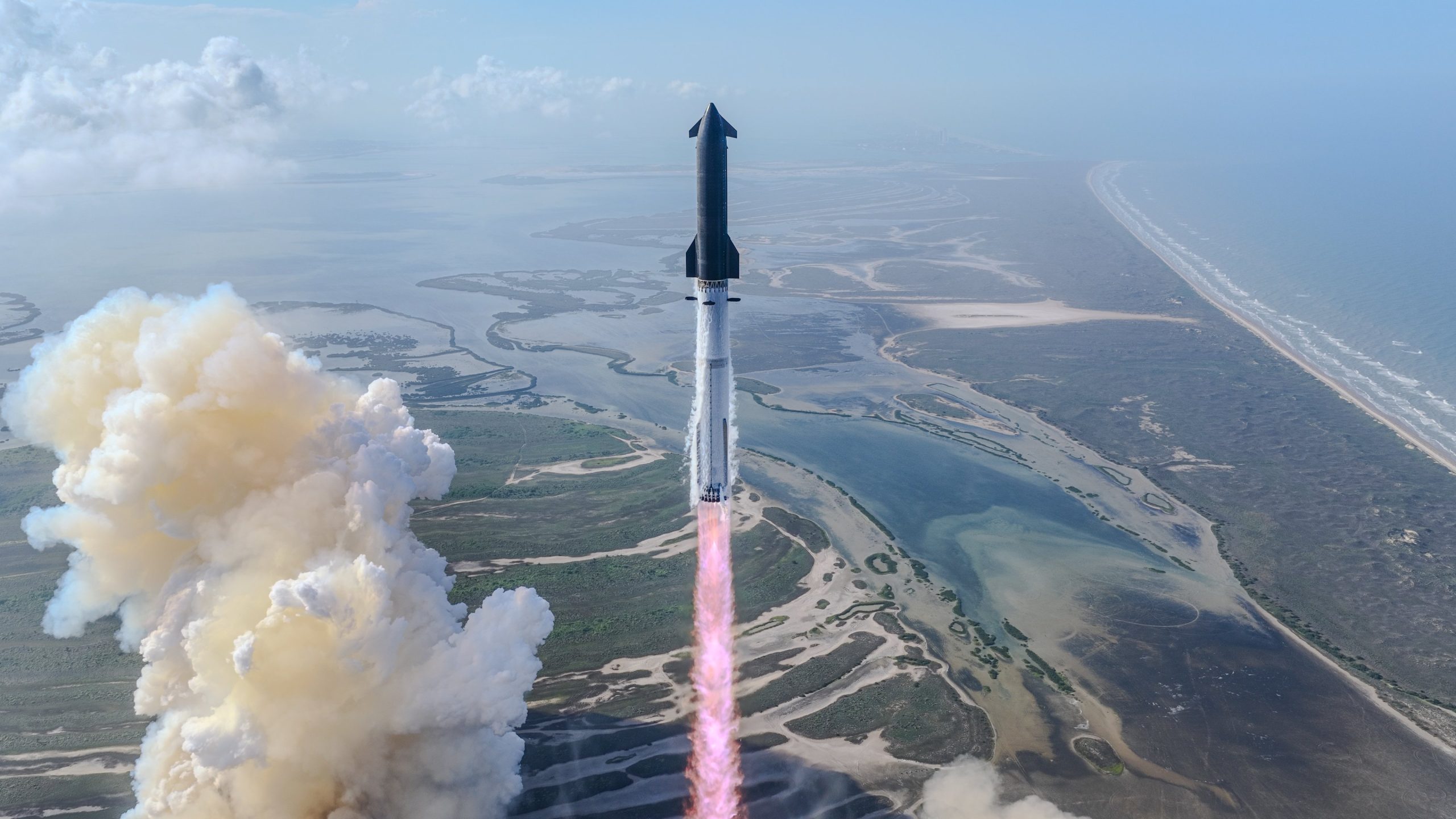
Wedbush Securities is initiating stock coverage on SpaceX (NASDAQ: SPCX), marking the first comments on the company since it went public several weeks ago. Wedbush and its analyst handling coverage, Dan Ives, are widely bullish on fellow Musk company Tesla (NASDAQ: TSLA).
Ives wrote his first note initiating coverage of SpaceX shares on Wednesday with a $190 price target and an ‘Outperform’ rating. The firm believes the company is well positioned off of its IPO because of its wide array of projects, including AI compute power and infrastructure, connectivity projects, and launches.
“We view SpaceX as one of the most differentiated assets within the tech market with a strong footprint across its three core markets, with Starlink driving success with connectivity,” Ives wrote, “Starship launches leading to a demand flywheel and increasing deal flow for its Colossus clusters.”
Elon Musk called it Epic: The full story of SpaceX’s Starship Flight 12
Wedbush leans heavily on Starlink, which they say is the “profitability driver given the strength of its recurring revenue base of ~12 million subscribers as of June 5th.” Ives believes Starlink is still in the “early innings” of penetrating the global telecommunications and broadband market, as it only holds less than a 1 percent share. However, this number is sure to increase over time.
It also highlights the importance of Starship, which it says is an “essential layer” of SpaceX’s overall success. SpaceX developing and displaying the ability to reuse rockets is a major cost and reliability advantage “as it reduces the necessary hardware launch costs while generating a feedback loop for future flights to improve their launch flight rate without accelerating capex spend.”
Finally, SpaceX’s recent AI/Compute projects are also very elementary, Ives writes. It is worth mentioning Wedbush said its $190 price target is derived from a valuation forecast that sees the company yielding roughly $2.48 trillion of implied enterprise value.
There are also some factors that Wedbush did not take into account with its initial coverage. The firm wrote in the note:
“We note that there is optional value coming from Starship’s accelerating scale towards sub-$200/kg unit economics, orbital data centers, and enterprise AI monetization as these factors could drive meaningful upside but these face major hurdles, so we do not take that into account with our valuation.”
SpaceX shares are down just over 2 percent today, trading at around $167 at the time of publication.

Tesla Optimus project fires up as Musk sees production line progress

Tesla gets its latest short from Michael Burry: ‘Happy it jumped back to this level’


