News
Tesla Full Self-Driving v14.1 first impressions: Robotaxi-like features arrive
Tesla Full Self-Driving v14.1 is here, and we got to experience it for ourselves.

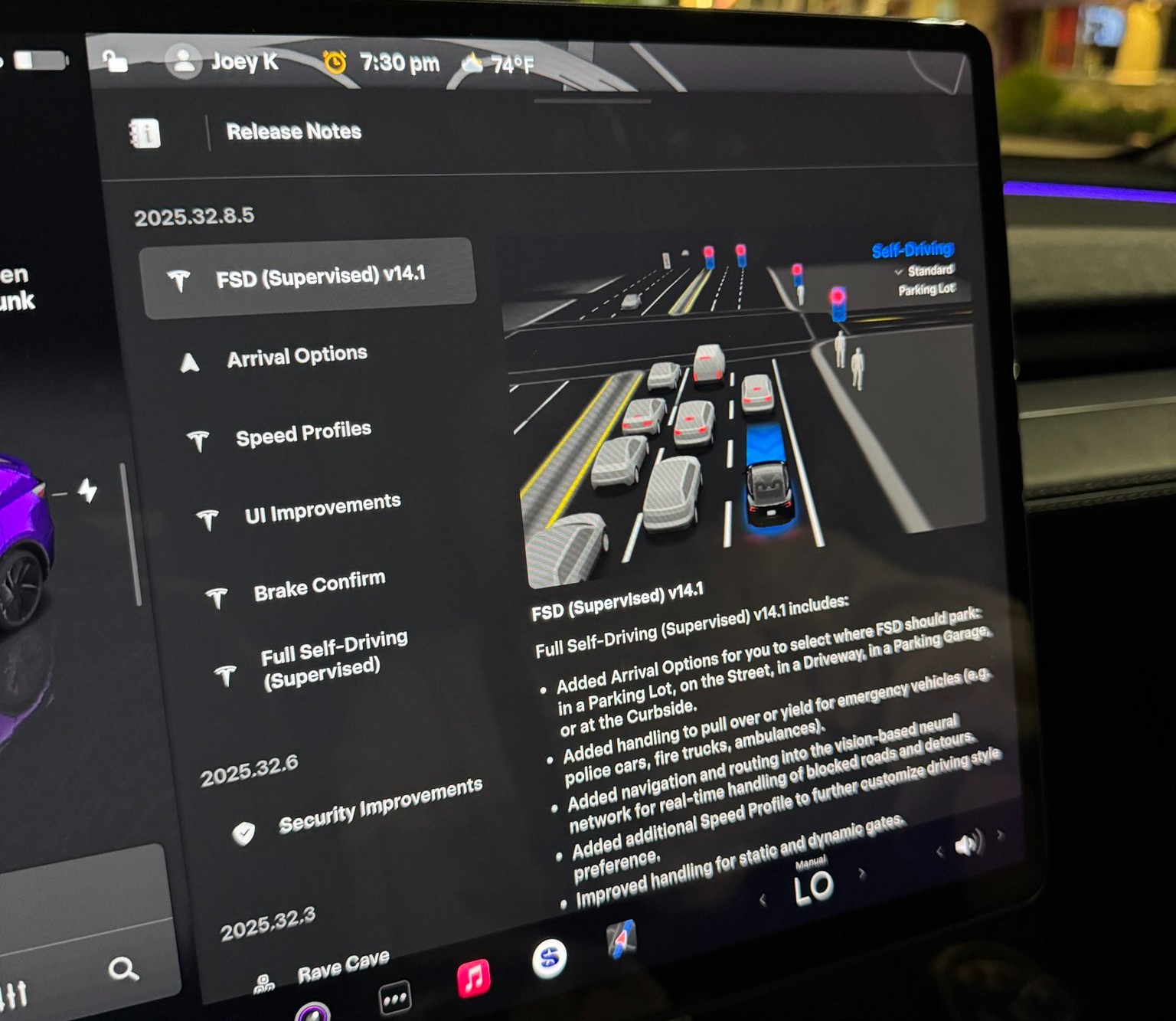
Tesla rolled out its Full Self-Driving v14.1 yesterday, its first public launch of its most robust and accurate FSD iteration yet. Luckily, I was able to get my hands on it through the Early Access Program.
The major changes in FSD v14.1 were revealed in the release notes, which outline several notable improvements in areas such as driving styles, parking, and overall navigation. Here’s what Tesla outlined fully in its release notes:
- Added Arrival Options for you to select where FSD should park: in a Parking Lot, on the Street, in a Driveway, in a Parking Garage, or at the Curbside.
- Added handling to pull over or yield for emergency vehicles (e.g. police cars, fire trucks, ambulances).
- Added navigation and routing into the vision-based neural network for real-time handling of blocked roads and detours.
- Added additional Speed Profile to further customize driving style preference.
- Improved handling for static and dynamic gates.
- Improved offsetting for road debris (e.g. tires, tree branches, boxes).
- Improve handling of several scenarios including: unprotected turns, lane changes, vehicle cut-ins, and school busses.
- Improved FSD’s ability to manage system faults and recover smoothly from degraded operation for enhanced reliability.
- Added alerting for residue build-up on interior windshield that may impact front camera visibility. If affected, visit Service for cleaning!
I wanted to try it for myself. My big must-dos were my complaints with v13.2.9, which included parking when arriving at a destination, Navigation when leaving a destination, and definitely a general improvement in the car traveling at an acceptable rate of speed, even when using the “Hurry” driving style.
Here’s what I noticed with the new Full Self-Driving v14.1:
Speed Profiles are More Realistic
I am driving on “Hurry” about 95% of the time when utilizing Full Self-Driving. In past versions, most notably v13.2.9, my Tesla would slowly reach the speed limit, and it would tend to hang out at about 1-2 MPH either above or below it.
My first observation with v14.1 was the vehicle’s tendency to get right up to speed and, since I was still on Hurry, drive slightly above the speed limit. It never got out of line; it traveled at speeds I would typically drive at manually.
I think this is a big improvement on its own, because I felt that I was pressing the accelerator too frequently in past FSD versions. Oftentimes, it just wasn’t going fast enough to justify the “Hurry” label; it felt more conservative and more like a student driver than anything.
Check it out:
🚨 Tesla Full Self-Driving v14.1 travels at more realistic speeds on local roads.
With 13.2.9, even on Hurry, it would hover the speed limit a little too much, often times traveling 1-2 MPH below or over.
It now travels at more realistic speeds. The removal of Max Speed and… pic.twitter.com/DPC0oBl3SC
— TESLARATI (@Teslarati) October 8, 2025
This was among my favorite improvements, and it was the first thing I noticed as the car navigated me to the Supercharger, where my next positive is.
Navigating into parking lots, self-parking at Supercharger
One of the changes noted in the Release Notes was the addition of Arrival Options, which allows the car to select the appropriate parking situation. Since I was going to charge, the car had already chosen “Charger” as the parking option.
Pulling into a gas station or convenience store, especially during work days, can be stressful, as they are usually congested and full of foot and vehicle traffic. In past FSD versions, I have noticed the car being slightly “jumpy” and even hesitant to proceed through the lot.
Driving through parking lots was a noticeable improvement. It seems as if the car is much more confident in making its way through, while still being aware and cautious enough to safely navigate to the Supercharger.
It then backed straight into a Supercharger stall, which was recently repaired and is once again active. I was actually upset it chose this specific stall because it had been inactive for a while. However, Tesla got this stall back up and running, the car chose it, and backed into the spot flawlessly:
🚨 Check out Tesla Full Self-Driving v14 choosing and backing into a Supercharger
After selecting this Supercharger at the beginning of my trip, my Tesla had already selected “Charger” as the arrival option pic.twitter.com/jqLNwQ9x0o
— TESLARATI (@Teslarati) October 8, 2025
This was super cool to experience, and I think it is a testament to how hard the Tesla AI team has worked. CEO Elon Musk recently stated that FSD would enable automatic parking at Superchargers, which was really awesome to experience firsthand.
I decided to leave the Supercharger and go to an auto parts store to pick up some interior cleaner and some microfiber towels. I love keeping my Tesla clean!
I also thought it would be a great opportunity to see how it would react to another parking lot, how it would navigate it, and let it choose a parking spot. It did it all flawlessly:
🚨 Here’s Tesla Full Self-Driving v14.1 navigating to a store, pulling in, choosing a parking spot, and backing right in
From v13.2.9, this is a drastic improvement. Typically, manual parking was required in past versions when arriving at retail locations. pic.twitter.com/kgFMu6dxnW
— TESLARATI (@Teslarati) October 8, 2025
I had zero complaints about everything here. All of it was done really well.
Making a choice after being caught in the middle of an intersection
I arrived at a tight intersection in Dallastown, PA, and what my car did next has catalyzed quite a conversation on X.
It proceeded out into the middle of the intersection as the light was green. It had to yield to oncoming traffic, and while waiting, the light turned yellow, then red.
Most people, including myself, would have turned right and proceeded through the intersection since the car was already past the line. However, FSD chose to back up and wait for the next light cycle, which I felt was also a more than acceptable option:
🚨 Super cool thing Tesla FSD v14.1 did: it proceeded thru this intersection to turn left, but the light had gone to red before the turn could be completed.
It put itself in reverse and backed up to the “Stop Here on Red” sign/line. Didn’t proceed at a red or impede others. pic.twitter.com/AKb1AI32fK
— TESLARATI (@Teslarati) October 8, 2025
There are some conflicting perspectives on what it chose to do here. Some said they would have proceeded and would want FSD to also proceed. I can agree with that perspective, but I also think it is not the worst thing in the world to back up. In Pennsylvania, I couldn’t find the exact law that says what is right or wrong. Instead, I did see that a left turn on red is only feasible when you’re going from a One-Way street to another One-Way.
I’m not totally sure what is “correct” here, but I think either option is fine. I have personally done both, and I’ve seen other drivers do both. I was more than fine with the car doing this, and I was honestly impressed that it did.
Navigated a busy grocery store lot, found suitable parking
This is not the busiest my local grocery store gets, but it was still congested enough for me to be impressed.
FSD decided to do one loop in the parking lot before it found a spot that it felt was good enough for me. I was perfectly fine with where it chose to park, and I thought it did a really great job. I was impressed with how stress-free I felt, as I have noted in the past that parking lots are definitely an area where Tesla needs to improve.
I was happy with its performance:
🚨 Here, @Tesla Full Self-Driving v14.1 searched for a parking space at the grocery store.
It did one loop, navigating safely through pedestrians and carts before it decided this spot was good enough for me.
This truly will take the stress out of parking at busy stores pic.twitter.com/73U3Bl7Odm
— TESLARATI (@Teslarati) October 8, 2025
Strange right turn signal as if it saw an emergency vehicle
This was the first bug I noticed with FSD v14.1. While traveling on a local road, it put the right turn signal on and approached the curb as if it was pulling over for an emergency vehicle or as if it was going to park on the street.
It then realized its mistake and proceeded:
Now for a couple bugs 🐞
Tesla FSD v14.1 put its right turn signal on as if it was going to pull over. It did move closer to curb, but then realized this wasn’t the correct maneuver for our route.
It proceeded without much issue pic.twitter.com/yoUoyzWMDM
— TESLARATI (@Teslarati) October 8, 2025
I’m not super sure what caused this, but I was a tad bit confused. There were no police cars, ambulances, or anyone with flashing lights to my rear. There was a dump truck on the other side of the road, and I almost felt like the way it navigated “around” that was probably what triggered it.
Navigation is still making strange decisions
I’ve written about navigation and my discontent with some of its decisions. It seems v14.1 didn’t resolve much of anything with navigation, and it did a couple of things wrong.
The first was that it tried to take the illogical and pointless path out of the Supercharger. I wrote about this a few days ago, as FSD tried to take my car the wrong way.
It did it again, but I overrode the decision, and it was all okay:
Bug 🐞 no. 3: I have this issue at this Supercharger and I talk about it frequently.
Navigation takes illogical and strange exit from Supercharger. I override, turning left instead of right, Nav adjusts and picks correct routing. Hoping this is resolved soon. pic.twitter.com/4VsCGHZbYW
— TESLARATI (@Teslarati) October 8, 2025
This is a minor issue, but it is still pretty frustrating. Hopefully, the navigation will learn after performing this adjustment after enough times.
The next navigation issue was more frustrating than the Supercharger one, especially considering it completely ignored the route. The navigation had the vehicle very clearly heading straight, but out of nowhere, the right turn signal went on. I overrode it, but the car still turned right, ignoring the navigation completely:
Bug 🐞 no. 2: Navigation clearly shows the route continuing straight through the traffic light. I noticed the right turn signal coming on, so I overrode it.
The car turned right anyway. I took over and drove manually until I was able to get to a stop so I could re-activate FSD pic.twitter.com/nxt4UlRqkK
— TESLARATI (@Teslarati) October 8, 2025
I ended up taking over here and driving until I could get to a stop sign.
Final Thoughts
I am really impressed with all of the changes Tesla made with FSD v14.1, and while there were a handful of bugs, things were tremendously better than v13.2.9.


Elon Musk
Tesla shows what Roadster drivers will see on screen before thruster activation
Tesla’s Roadster video reveals a fighter jet inspired cockpit with a 5,500 PSI thruster gauge.

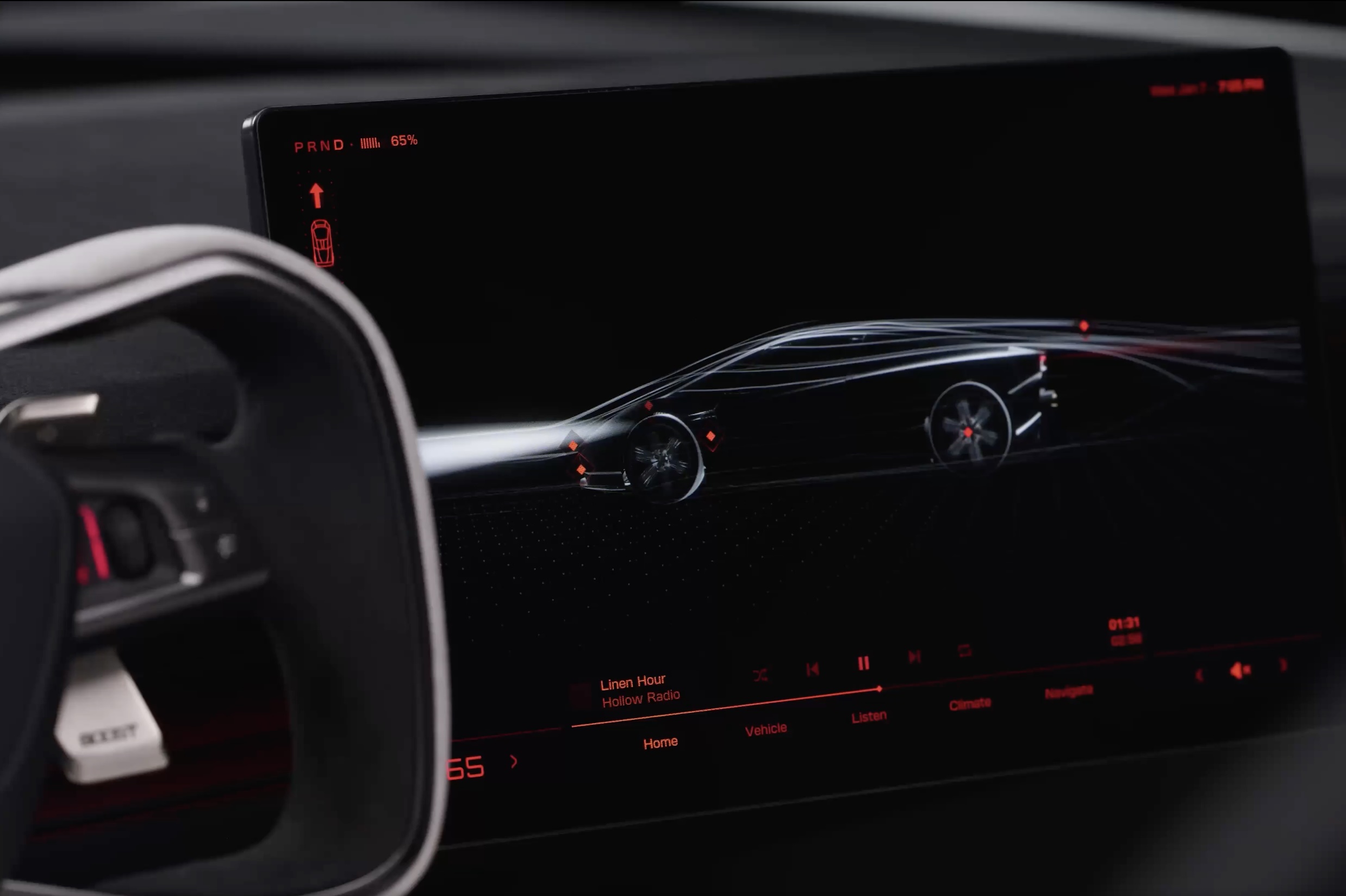
Tesla has given future owners their clearest look yet at the cockpit of its next generation Roadster. In a 34 second video posted to X on Friday afternoon, the company walked through the car’s touchscreen with a caption: “Inspired by fighter jet cockpits, Roadster’s interface was designed around the pilot.”
The clip opens on a black screen with red graphics and a 3D wireframe of the car, which sits beside the Roadster’s squared off yoke. Tapping parts of the model brings up controls for the rear wing, including low drag and high downforce positions, along with a charging page with a charge limit bar and a small music player. A row of tabs along the bottom reads Home, Vehicle, Listen, Climate and Navigate.
Most of the video is spent in Track Mode. The dashboard shows a live circuit map, a list of session lap times, brake and motor temperatures, and pressure and temperature readouts for each tire. A setup page lets the driver pick Auto, Low Drag, High Downforce or Custom aero modes, adjust aero balance and brake balance, and switch stability and traction control off. Along the bottom, a status bar reads “Thruster · 5,500 PSI” next to a “Boost Ready” indicator.
That gauge ties the software to the hardware Tesla showed off near Waco, Texas on October 15. The Thrust and Rocket versions use cold gas thrusters fed by carbon overwrapped pressure vessels, and Tesla lists 0 to 60 mph times of under 0.9 seconds and under 0.59 seconds for them, as Teslarati detailed in its breakdown of the three Roadster configurations. The base Performance car relies on a fan and ground sealing system for grip, and the aero settings on screen match the active wings and suction setup covered in our look at how the Roadster generates downforce.
The Roadster layout is a departure from the rest of Tesla’s lineup. Instead of a map centered screen, the Roadster puts the car itself at the center of the home page, and Tesla’s Roadster page lists two smaller forward displays alongside the main touchscreen. Tesla has not said whether any of the Track Mode telemetry will make its way to the Model 3 Performance or other vehicles.
The interface could still change before deliveries. Elon Musk said at the event that Roadster production will begin in 2028, and Tesla says the flagship Rocket version is not approved for public road use. Reservations are open with a $50,000 payment, while Thrust is listed as a limited release and Rocket is invite only.
Those who want to see the car in person will get their first chance this weekend. The Roadster goes on display in the lobby of the Petersen Automotive Museum in Los Angeles from October 24 to 27, according to Sawyer Merritt, the first time the public will be able to view it up close.
Elon Musk
Tesla reveals Optimus Academy, where robots teach themselves
Tesla has begun building production quality Optimus robots in Fremont and revealed its training plan.
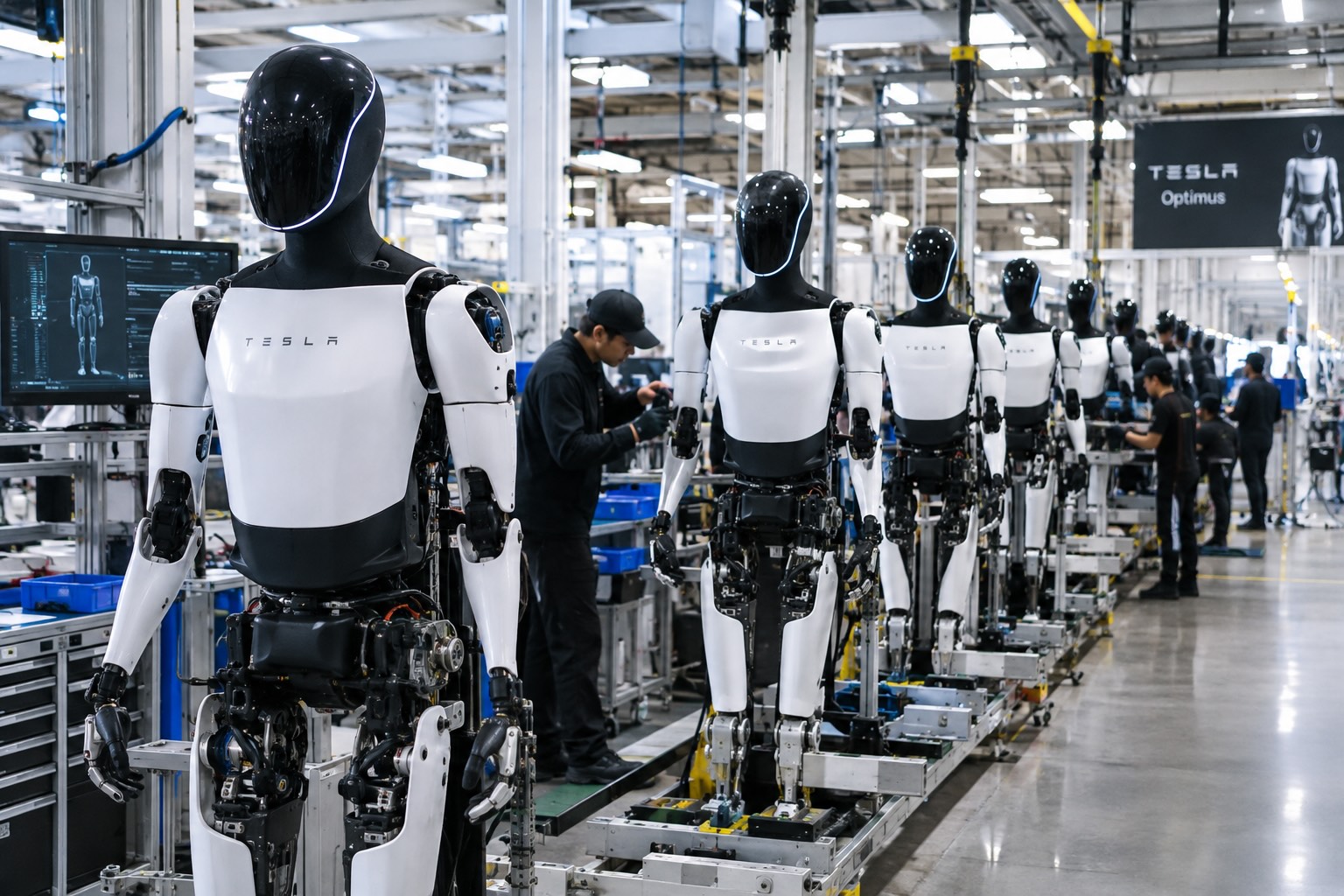
Tesla has started building Optimus on the high volume line it set up inside its Fremont factory, and the company says the robots coming off it are the first that meet the bar for a real product. “The bots coming off this line are the first production-quality bots that we have manufactured,” Tesla wrote in its third quarter shareholder letter, adding that it has “proven that the current manufacturing process for Optimus is suitable for a commercial product.”
The line sits in space that built the Model S and Model X until this spring. Tesla cleared the old vehicle line in 46 days, as Teslarati reported in July, to make room for robot production sized for one million units a year. On Wednesday’s earnings call, Elon Musk said most of the equipment for that capacity is already in Fremont, with output set to climb toward roughly 20,000 robots a week as the line ramps.
Musk described the ramp as a classic S curve. “The growth of Optimus is an S curve, but the initial curve is a shallow slope,” he said. The team is now refining the robot’s AI, electromechanical design, reliability and service life, and Musk expects that work to be finished by the end of next year, when Tesla plans to start delivering Optimus to outside companies for dangerous, repetitive and around the clock jobs.
The most interesting part of the call was how Tesla plans to teach the robots. Its cars send real driving data back to the AI team from millions of vehicles, but Optimus has no fleet like that yet. “A big difference with Optimus versus the cars is we don’t have this vast fleet of cars from which we can gather training data,” Musk said. Tesla’s answer is an Optimus Academy, where 10,000 to 20,000 robots will practice a wide range of tasks and feed what they learn into the next version of the model. Every unit off the Fremont line becomes a source of that training data.
Smarter hardware is on the way too. Tesla plans to put its AI5 chip into Optimus next year, and Musk said a new Optimus video should arrive within one or two months showing the robot completing tasks driven by AI rather than preprogrammed motions. He took aim at rival humanoid demos that only run scripted routines, saying those would not hold up in the real world.
The supply chain is lining up behind the program. In September, Tesla certified Tuopu, Joyson and Sanhua as mass production partners for Optimus components. A far larger Optimus factory is also rising at Giga Texas, where drone footage from Joe Tegtmeyer showed the steel frame nearing completion, and Musk has pegged that plant’s long term target at 10 million robots a year.
Tesla executives also said Optimus production costs are trending toward the expected manufacturing cost of Cybercab, a sign the robot is being engineered for volume from the start. The hands remain the toughest piece of the design, a point Musk also made at the X Takeover event earlier this month, as Teslarati covered at the time, and that is where much of the current engineering effort is focused.
Elon Musk
The Starship moon landing number NASA and Elon Musk can’t agree on
Musk disputes NASA estimate of 22 Starship launches for Moon landing, predicting 6 to 8.
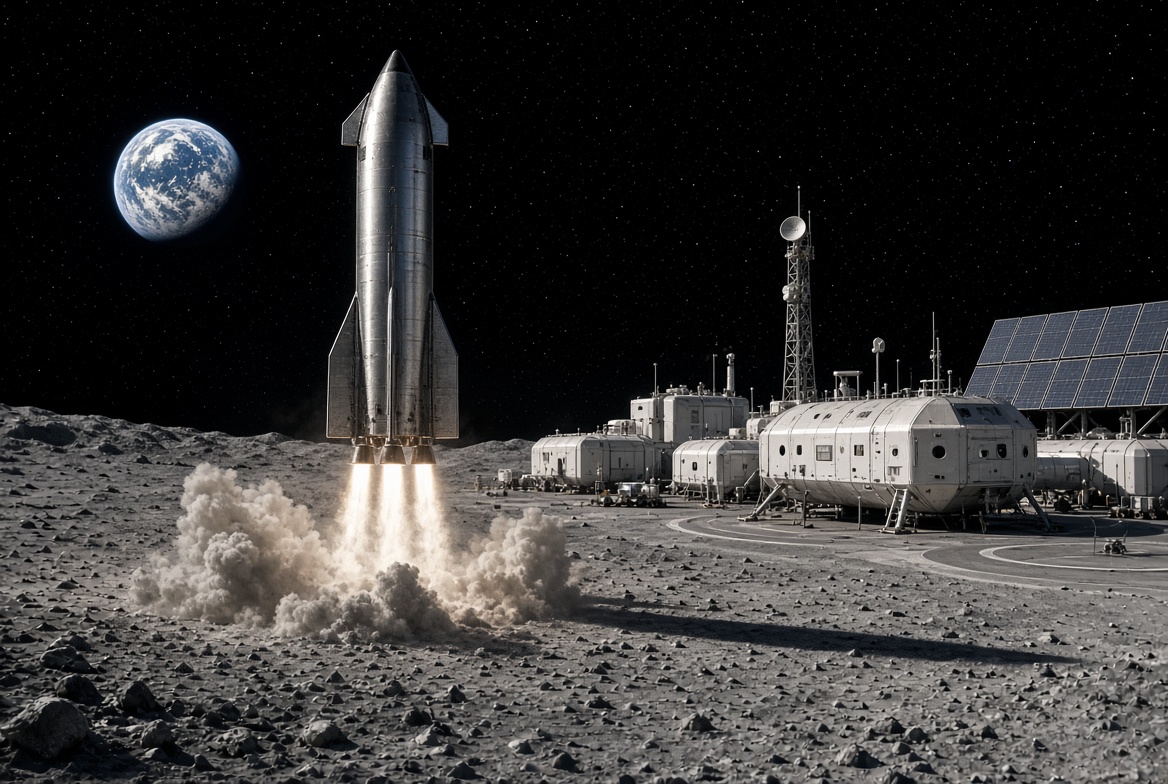
Elon Musk is disputing a new NASA safety panel estimate of how many Starship launches it will take to put astronauts on the Moon, saying the real number will be less than half the panel’s figure.
On Thursday, NASA’s Aerospace Safety Advisory Panel held its quarterly public meeting. Panel member Charlie Precourt, a former NASA astronaut, flagged the fueling process for SpaceX’s lunar lander as a major risk for Artemis IV, the mission planned to land a crew on the Moon in 2028. “We need to keep our eyes on numerous required fuelings for the lander,” Precourt said, according to Ars Technica. “I think the last estimate is around 22 flights.”
Ars Technica’s Eric Berger posted the comment on X, and Musk replied. “That’s way too high,” Musk wrote. “Actual number will be more like 6 to 8.”
The disagreement comes down to a basic problem with sending a ship as large as Starship to the Moon. Starship burns nearly all of its propellant just reaching Earth orbit, so it cannot continue on to the Moon without stopping for a refill. SpaceX’s answer is a gas station in space. First, a Starship that works as a storage tank, called a depot, is launched into orbit. Then a series of tanker Starships launch one at a time, dock with the depot and pump their leftover propellant into it. Once the depot is full, the lunar lander version of Starship launches, docks, fills up and heads for the Moon.
Every tanker trip is its own full rocket launch, which is why the count matters. More launches mean more time, more cost and more chances for something to go wrong before astronauts ever leave Earth. Berger estimated that even if SpaceX reaches twice weekly Starship launches by the end of 2027, filling a depot at the panel’s number would still take roughly three months.
How many tankers are needed depends mostly on how much propellant each one can carry to orbit and how much is lost along the way. Starship’s fuel and oxygen are stored at extremely cold temperatures, and some of it slowly boils off while waiting in orbit. More is lost in each transfer. NASA appears to be working from what Starship can lift today, while Musk’s range assumes a more capable rocket.
Musk has pushed back on higher counts before. In 2021, after a government document suggested 16 launches, he called that “extremely unlikely” and said eight tankers would be the most required.
Much of the answer depends on hardware SpaceX has not finished flying. As Teslarati noted earlier this year, the company plans to carry out the refueling process with its upgraded V3 Starship, and Precourt described Artemis IV as carrying “a large number of firsts.” He also praised NASA Administrator Jared Isaacman’s team for working to clear obstacles for both SpaceX and Blue Origin, whose Blue Moon lander does not rely on orbital refueling for its first mission.

Tesla shows what Roadster drivers will see on screen before thruster activation

Tesla reveals Optimus Academy, where robots teach themselves


