News
Tesla Battery Range in Sub-Zero and Snowy Conditions

Over the month of January I decided to study the impact sub-zero weather conditions had on the battery range of my Tesla Model S and found it to be diminished by roughly 40%. Range will vary depending on one’s driving habits but the effects of winter on a Tesla Model S and its battery range should roughly mirror the data that I was able to collect.
Collecting Battery Range Data
I recorded my Tesla’s rated range at the beginning of the day and once again at the end of the day. I logged the amount of kWhs consumed during my daily journey, the actual miles driven and the average temperature for that day. All of this was plotted into a data grid so that I can analyze the effects winter conditions would have on my battery range. The results were as follows:
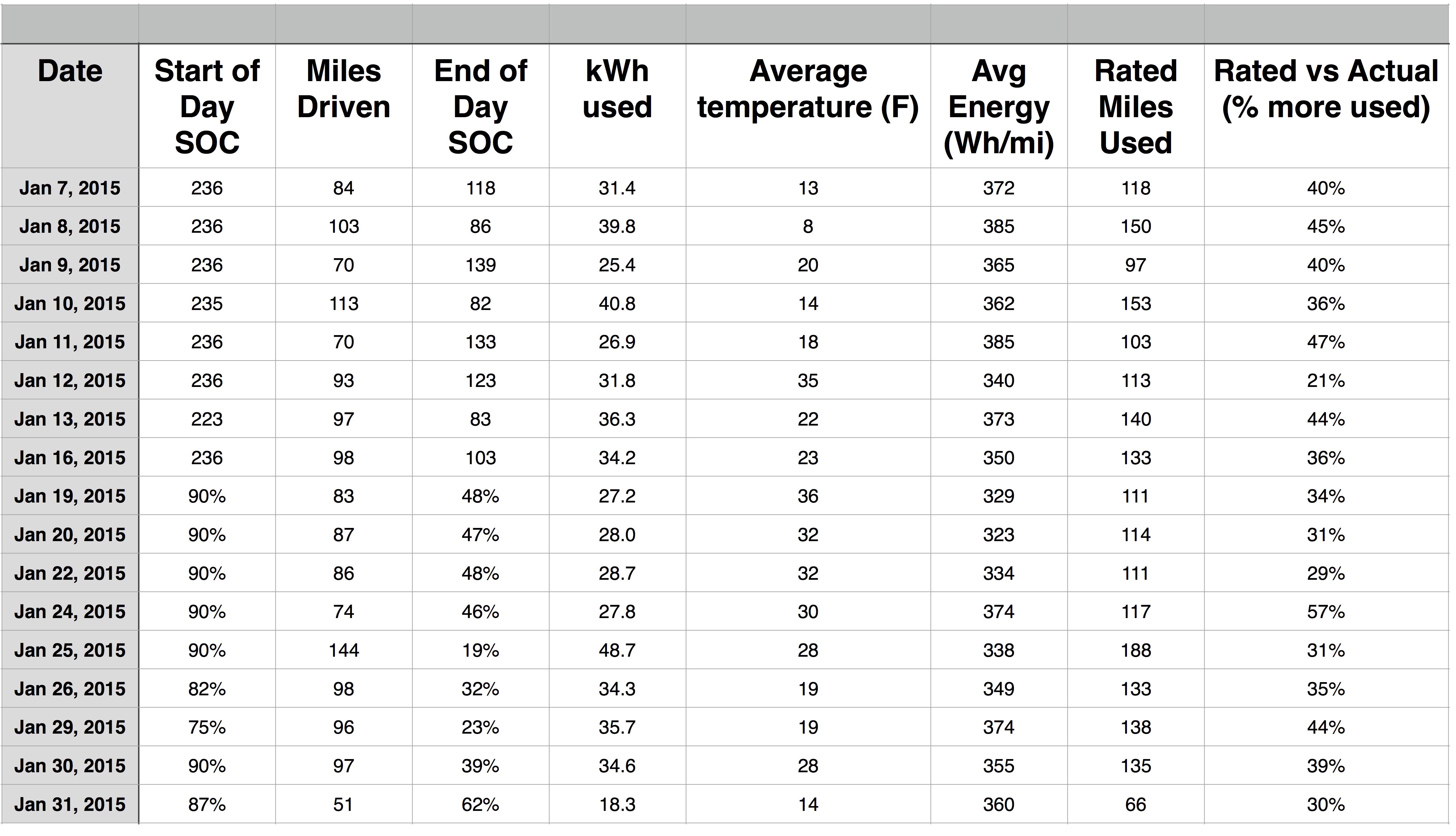
Comparing the Tesla Model S rated range display versus the actual rated miles used during winter weather conditions. Results indicate an increase of 21% to as high as a 57% in energy consumption.
Results
Plotting the % of rated miles used / miles driven against temperature lets us see the correlation between outside temperature and battery range.
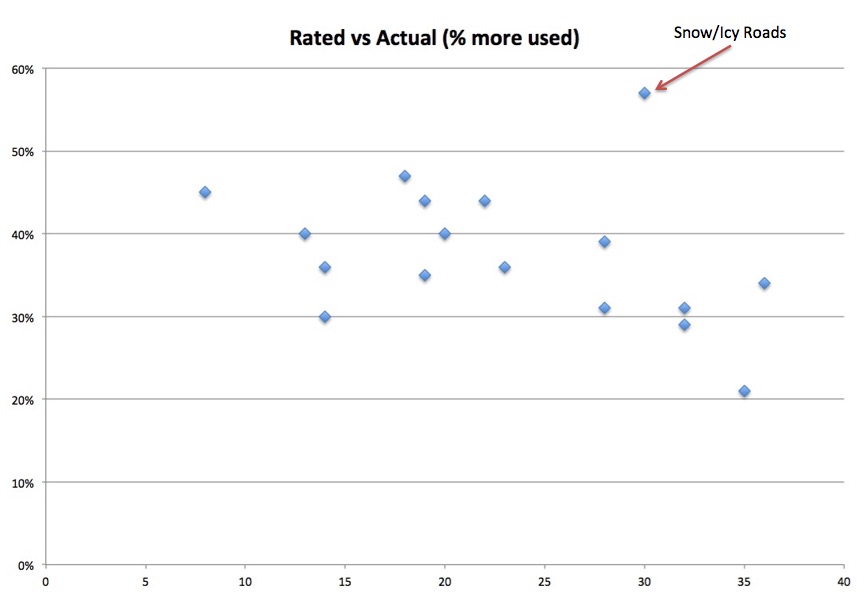
Here you can generally see a trend towards improved efficiency as outside temperature increases. There’s one big outlier which turns out to be a day when the roads were covered in snow and ice. Taking out that data point shows a better correlation between temperature and battery range.
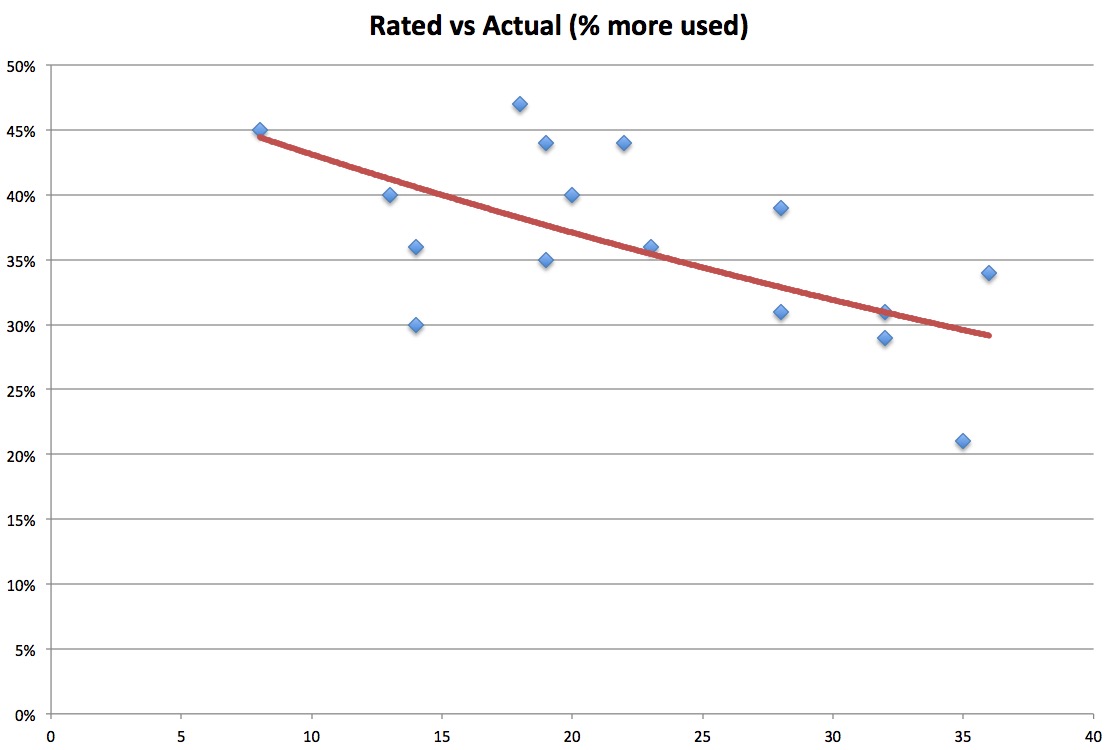
Using a trend line we can see that the outlier at the 57% mark should have been closer to 32% had the roads been more clear. Driving through snow and ice conditions affected the range by an extra 25%.
The data point at the 30% mark during 14 degree is a result of me pre-warming the Model S while it was still plugged in. Warming your car up from shore power prior to taking a trip improves your efficiency.
Summary
Using the data above and a calculated trend line I came up with the table below. This table is showing the actual maximum range I’d expect to get out of a 85kW battery pack which has a rated range of 265 miles:
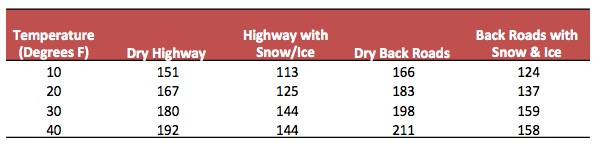
This analysis is based on data I collected on my car over the course of one month and during a variety of winter conditions. I found it really eye opening to see the rated range of my Model S go from 265 to a real world average of 143 miles during the winter (90% charge, 40% range degradation). For the 60kW model this would be 112 miles.
Fortunately Tesla appears to be placing Superchargers closer together which will help alleviate any issue with running out of range because of winter weather conditions.
How do you best prepare for winter driving in your Tesla Model S?
- Expect to use (on average) 40% more power during the winter.
- Expect to lose about 10 miles of real range for every 10 degree drop.
- If the roads aren’t dry expect to lose up to 25% more range.
- Plan your charging and driving accordingly — don’t cut it close.
I hope this information has helped you understand the effects of winter on the Tesla Model S. If you have your own data, observations or questions to share, we’d love to hear them so leave us a note at the bottom of the page.


Elon Musk
Tesla reveals Optimus Academy, where robots teach themselves
Tesla has begun building production quality Optimus robots in Fremont and revealed its training plan.

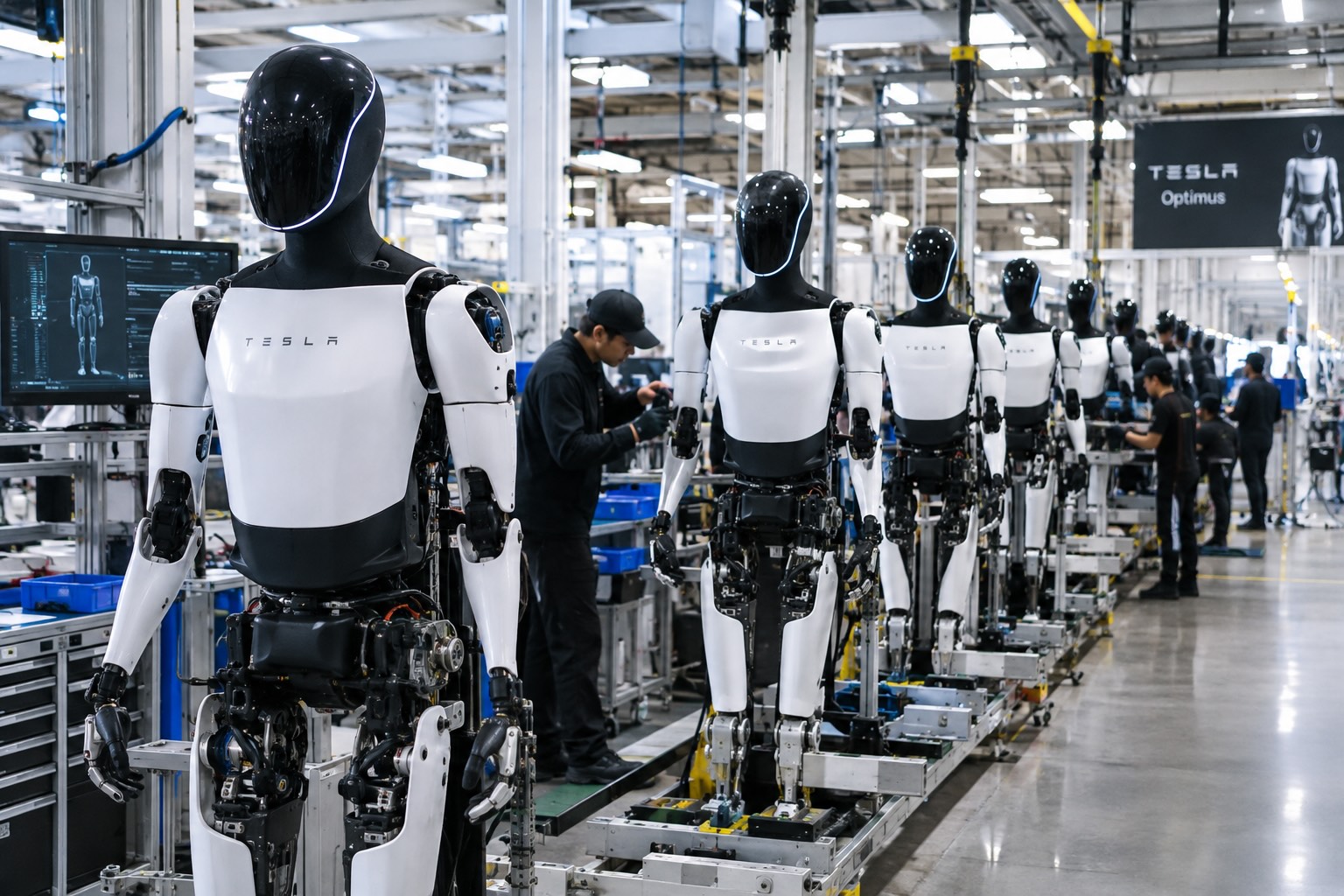
Tesla has started building Optimus on the high volume line it set up inside its Fremont factory, and the company says the robots coming off it are the first that meet the bar for a real product. “The bots coming off this line are the first production-quality bots that we have manufactured,” Tesla wrote in its third quarter shareholder letter, adding that it has “proven that the current manufacturing process for Optimus is suitable for a commercial product.”
The line sits in space that built the Model S and Model X until this spring. Tesla cleared the old vehicle line in 46 days, as Teslarati reported in July, to make room for robot production sized for one million units a year. On Wednesday’s earnings call, Elon Musk said most of the equipment for that capacity is already in Fremont, with output set to climb toward roughly 20,000 robots a week as the line ramps.
Musk described the ramp as a classic S curve. “The growth of Optimus is an S curve, but the initial curve is a shallow slope,” he said. The team is now refining the robot’s AI, electromechanical design, reliability and service life, and Musk expects that work to be finished by the end of next year, when Tesla plans to start delivering Optimus to outside companies for dangerous, repetitive and around the clock jobs.
The most interesting part of the call was how Tesla plans to teach the robots. Its cars send real driving data back to the AI team from millions of vehicles, but Optimus has no fleet like that yet. “A big difference with Optimus versus the cars is we don’t have this vast fleet of cars from which we can gather training data,” Musk said. Tesla’s answer is an Optimus Academy, where 10,000 to 20,000 robots will practice a wide range of tasks and feed what they learn into the next version of the model. Every unit off the Fremont line becomes a source of that training data.
Smarter hardware is on the way too. Tesla plans to put its AI5 chip into Optimus next year, and Musk said a new Optimus video should arrive within one or two months showing the robot completing tasks driven by AI rather than preprogrammed motions. He took aim at rival humanoid demos that only run scripted routines, saying those would not hold up in the real world.
The supply chain is lining up behind the program. In September, Tesla certified Tuopu, Joyson and Sanhua as mass production partners for Optimus components. A far larger Optimus factory is also rising at Giga Texas, where drone footage from Joe Tegtmeyer showed the steel frame nearing completion, and Musk has pegged that plant’s long term target at 10 million robots a year.
Tesla executives also said Optimus production costs are trending toward the expected manufacturing cost of Cybercab, a sign the robot is being engineered for volume from the start. The hands remain the toughest piece of the design, a point Musk also made at the X Takeover event earlier this month, as Teslarati covered at the time, and that is where much of the current engineering effort is focused.
Elon Musk
The Starship moon landing number NASA and Elon Musk can’t agree on
Musk disputes NASA estimate of 22 Starship launches for Moon landing, predicting 6 to 8.
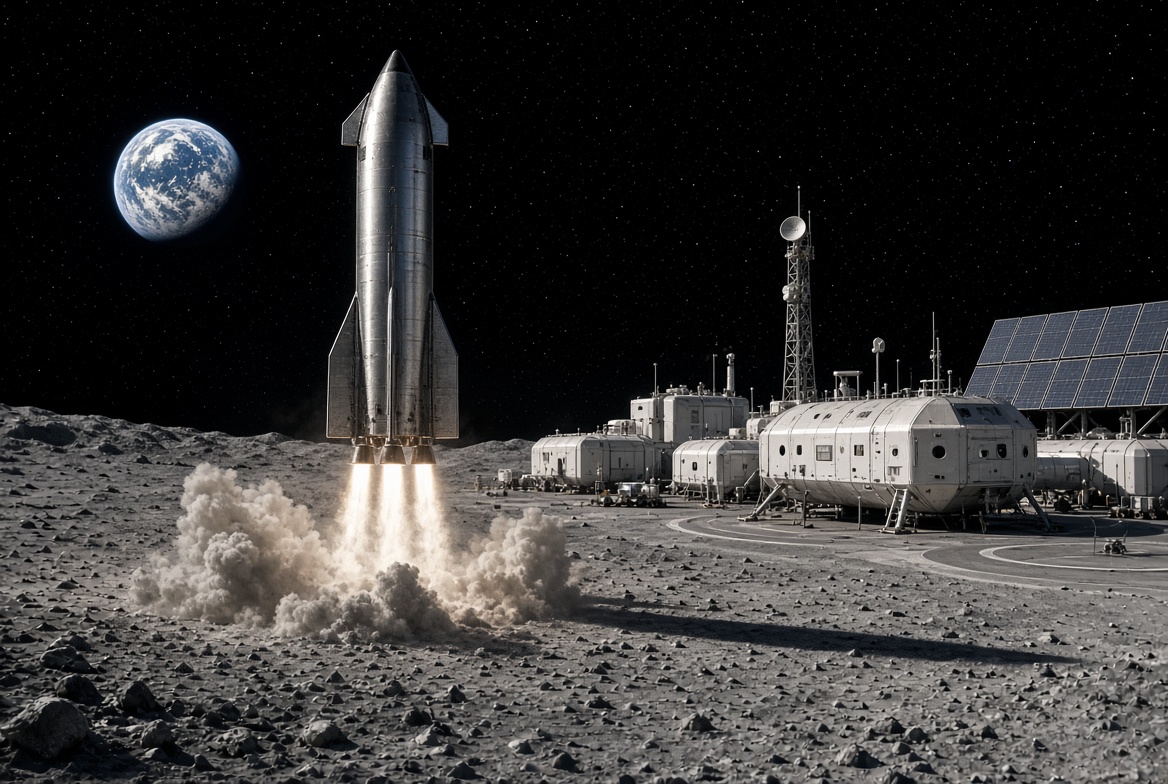
Elon Musk is disputing a new NASA safety panel estimate of how many Starship launches it will take to put astronauts on the Moon, saying the real number will be less than half the panel’s figure.
On Thursday, NASA’s Aerospace Safety Advisory Panel held its quarterly public meeting. Panel member Charlie Precourt, a former NASA astronaut, flagged the fueling process for SpaceX’s lunar lander as a major risk for Artemis IV, the mission planned to land a crew on the Moon in 2028. “We need to keep our eyes on numerous required fuelings for the lander,” Precourt said, according to Ars Technica. “I think the last estimate is around 22 flights.”
Ars Technica’s Eric Berger posted the comment on X, and Musk replied. “That’s way too high,” Musk wrote. “Actual number will be more like 6 to 8.”
The disagreement comes down to a basic problem with sending a ship as large as Starship to the Moon. Starship burns nearly all of its propellant just reaching Earth orbit, so it cannot continue on to the Moon without stopping for a refill. SpaceX’s answer is a gas station in space. First, a Starship that works as a storage tank, called a depot, is launched into orbit. Then a series of tanker Starships launch one at a time, dock with the depot and pump their leftover propellant into it. Once the depot is full, the lunar lander version of Starship launches, docks, fills up and heads for the Moon.
Every tanker trip is its own full rocket launch, which is why the count matters. More launches mean more time, more cost and more chances for something to go wrong before astronauts ever leave Earth. Berger estimated that even if SpaceX reaches twice weekly Starship launches by the end of 2027, filling a depot at the panel’s number would still take roughly three months.
How many tankers are needed depends mostly on how much propellant each one can carry to orbit and how much is lost along the way. Starship’s fuel and oxygen are stored at extremely cold temperatures, and some of it slowly boils off while waiting in orbit. More is lost in each transfer. NASA appears to be working from what Starship can lift today, while Musk’s range assumes a more capable rocket.
Musk has pushed back on higher counts before. In 2021, after a government document suggested 16 launches, he called that “extremely unlikely” and said eight tankers would be the most required.
Much of the answer depends on hardware SpaceX has not finished flying. As Teslarati noted earlier this year, the company plans to carry out the refueling process with its upgraded V3 Starship, and Precourt described Artemis IV as carrying “a large number of firsts.” He also praised NASA Administrator Jared Isaacman’s team for working to clear obstacles for both SpaceX and Blue Origin, whose Blue Moon lander does not rely on orbital refueling for its first mission.
Elon Musk
Tesla’s secretive “Project Crystal Sun” gets a big green light in Texas
Fort Bend County approved four incentive agreements Thursday for Tesla’s proposed $10.1 billion solar factory.
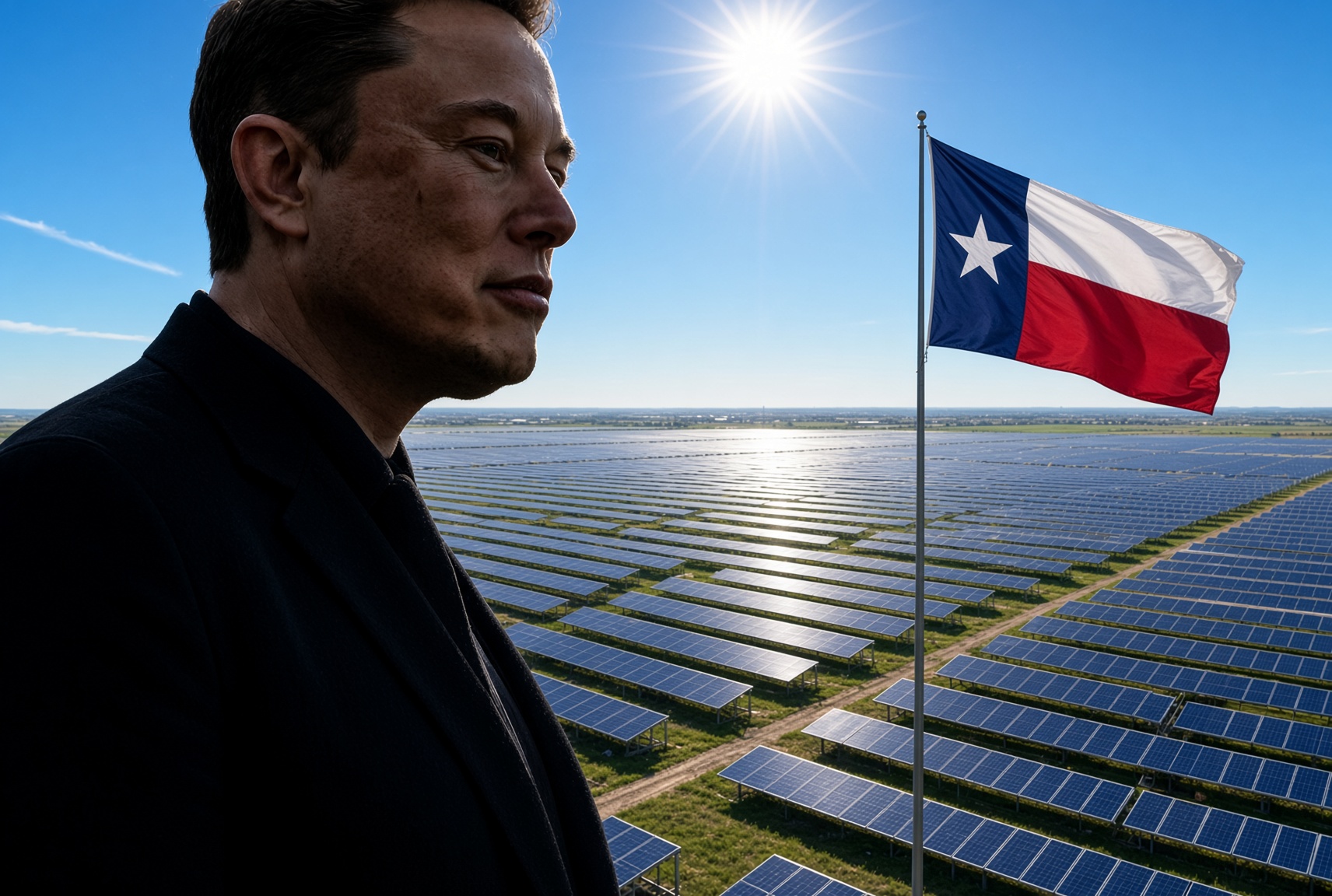
Fort Bend County commissioners on Thursday approved a package of tax incentives for Tesla’s proposed $10.1 billion solar cell factory near Needville, Texas, giving the company one of the last local approvals it needs before it decides where to build. All four Tesla agreements passed 4 to 0.
The votes covered a property tax abatement inside Reinvestment Zone No. 34, a Chapter 381 economic development agreement, a foreign trade zone non-objection paired with payments in lieu of certain taxes, and a separate payment in lieu of taxes “true up” agreement, according to agenda notes from the Fort Bend Commissioners Court meeting.
The project, known internally as “Project Crystal Sun,” would make solar cells and finished modules on roughly 3,000 acres near FM 762 and FM 1994, south of the Brazos River. As Teslarati reported when the filing first surfaced in August, Tesla’s application under the state’s JETI Act splits the investment into $1.5 billion in real property and $8.6 billion in equipment, with 9,712 permanent jobs projected by 2033 and commercial operations targeted for the first quarter of 2029. The plant would handle the full chain from ingot and wafer production through cell testing.
Inside Tesla’s secretive $10 Billion “Project Crystal Sun” filing
Thursday’s approval does not lock in the site. Tesla has told the Texas Comptroller it is still weighing other locations, and site selection adviser David Dennison told Lamar Consolidated ISD trustees in September that the race had narrowed to Fort Bend and one out of state rival with a “very compelling package,” according to the Houston Chronicle. Tesla hopes to decide before the end of 2026, and the incentives still need sign off from the Comptroller and the Governor’s office.
Local officials have now done nearly everything within their control. Commissioners created the reinvestment zone in an August 24 special meeting, with Interim County Judge Daniel Wong formally withdrawing himself over his engineering firm’s past work with Tesla. Lamar CISD trustees voted 7 to 0 on September 15 to advance a JETI agreement that would tax Tesla’s qualifying property at 50 percent of its value for maintenance and operations from 2029 through 2038.
The plant lines up with a target Elon Musk set on Tesla’s Q4 2025 earnings call in January, when he said the company would “work toward getting 100 GW a year of solar cell production, integrating across the entire supply chain from raw materials all the way to finished solar panels.” In March, Tesla was reported to be negotiating a $2.9 billion purchase of Chinese solar manufacturing equipment bound for Texas. The Houston area already hosts Tesla’s Megafactory in Brookshire, where Megapack 3 production has started. Tesla said on its Q3 call that Megapack supply for 2027 is nearly sold out, and Musk wrote on X Thursday that the company is “increasing production of Megapacks as much as possible,” as demand from data centers climbs.

Tesla reveals Optimus Academy, where robots teach themselves

The Starship moon landing number NASA and Elon Musk can’t agree on


