News
Tesla Full Self-Driving v14.1 first impressions: Robotaxi-like features arrive
Tesla Full Self-Driving v14.1 is here, and we got to experience it for ourselves.

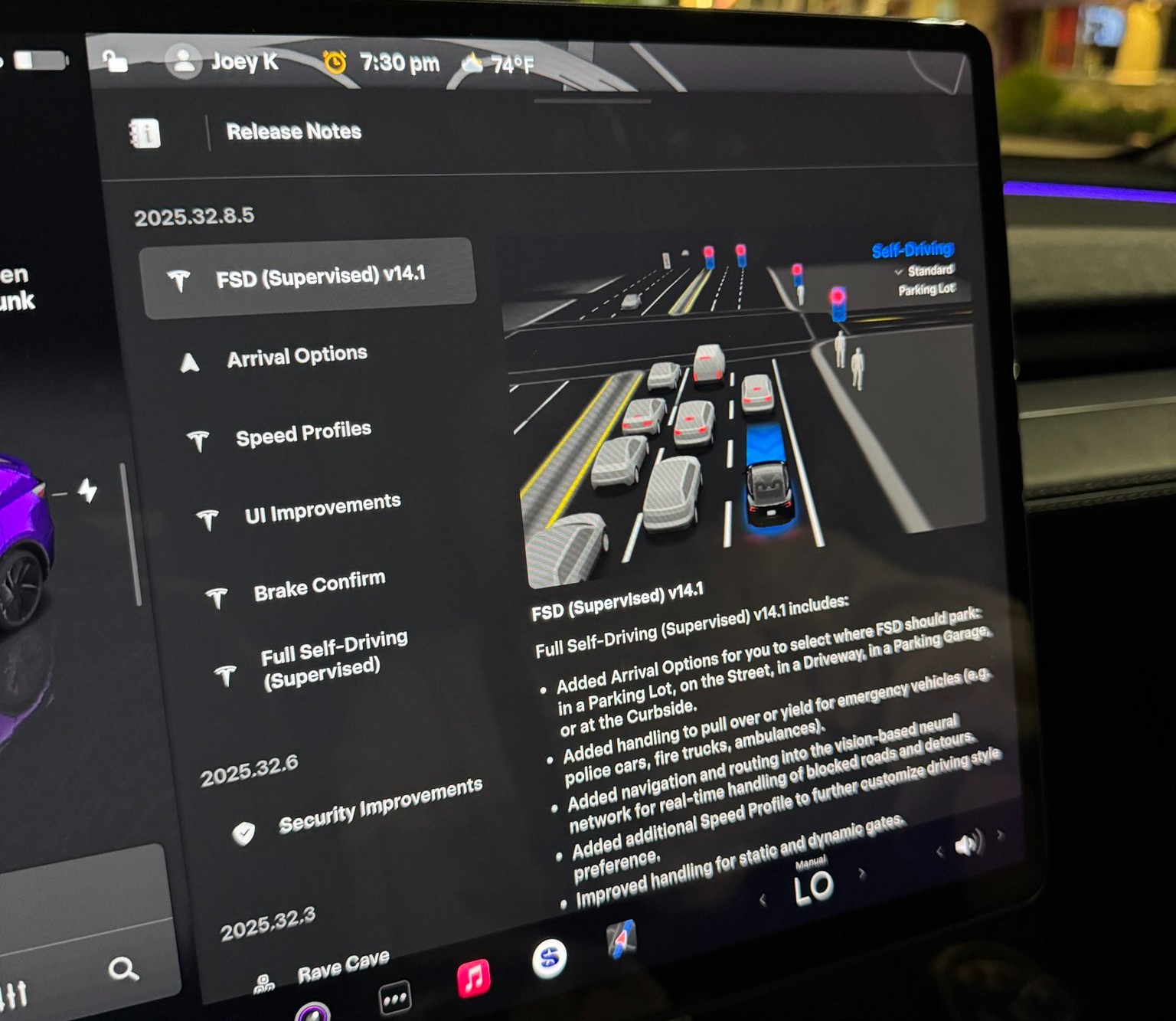
Tesla rolled out its Full Self-Driving v14.1 yesterday, its first public launch of its most robust and accurate FSD iteration yet. Luckily, I was able to get my hands on it through the Early Access Program.
The major changes in FSD v14.1 were revealed in the release notes, which outline several notable improvements in areas such as driving styles, parking, and overall navigation. Here’s what Tesla outlined fully in its release notes:
- Added Arrival Options for you to select where FSD should park: in a Parking Lot, on the Street, in a Driveway, in a Parking Garage, or at the Curbside.
- Added handling to pull over or yield for emergency vehicles (e.g. police cars, fire trucks, ambulances).
- Added navigation and routing into the vision-based neural network for real-time handling of blocked roads and detours.
- Added additional Speed Profile to further customize driving style preference.
- Improved handling for static and dynamic gates.
- Improved offsetting for road debris (e.g. tires, tree branches, boxes).
- Improve handling of several scenarios including: unprotected turns, lane changes, vehicle cut-ins, and school busses.
- Improved FSD’s ability to manage system faults and recover smoothly from degraded operation for enhanced reliability.
- Added alerting for residue build-up on interior windshield that may impact front camera visibility. If affected, visit Service for cleaning!
I wanted to try it for myself. My big must-dos were my complaints with v13.2.9, which included parking when arriving at a destination, Navigation when leaving a destination, and definitely a general improvement in the car traveling at an acceptable rate of speed, even when using the “Hurry” driving style.
Here’s what I noticed with the new Full Self-Driving v14.1:
Speed Profiles are More Realistic
I am driving on “Hurry” about 95% of the time when utilizing Full Self-Driving. In past versions, most notably v13.2.9, my Tesla would slowly reach the speed limit, and it would tend to hang out at about 1-2 MPH either above or below it.
My first observation with v14.1 was the vehicle’s tendency to get right up to speed and, since I was still on Hurry, drive slightly above the speed limit. It never got out of line; it traveled at speeds I would typically drive at manually.
I think this is a big improvement on its own, because I felt that I was pressing the accelerator too frequently in past FSD versions. Oftentimes, it just wasn’t going fast enough to justify the “Hurry” label; it felt more conservative and more like a student driver than anything.
Check it out:
🚨 Tesla Full Self-Driving v14.1 travels at more realistic speeds on local roads.
With 13.2.9, even on Hurry, it would hover the speed limit a little too much, often times traveling 1-2 MPH below or over.
It now travels at more realistic speeds. The removal of Max Speed and… pic.twitter.com/DPC0oBl3SC
— TESLARATI (@Teslarati) October 8, 2025
This was among my favorite improvements, and it was the first thing I noticed as the car navigated me to the Supercharger, where my next positive is.
Navigating into parking lots, self-parking at Supercharger
One of the changes noted in the Release Notes was the addition of Arrival Options, which allows the car to select the appropriate parking situation. Since I was going to charge, the car had already chosen “Charger” as the parking option.
Pulling into a gas station or convenience store, especially during work days, can be stressful, as they are usually congested and full of foot and vehicle traffic. In past FSD versions, I have noticed the car being slightly “jumpy” and even hesitant to proceed through the lot.
Driving through parking lots was a noticeable improvement. It seems as if the car is much more confident in making its way through, while still being aware and cautious enough to safely navigate to the Supercharger.
It then backed straight into a Supercharger stall, which was recently repaired and is once again active. I was actually upset it chose this specific stall because it had been inactive for a while. However, Tesla got this stall back up and running, the car chose it, and backed into the spot flawlessly:
🚨 Check out Tesla Full Self-Driving v14 choosing and backing into a Supercharger
After selecting this Supercharger at the beginning of my trip, my Tesla had already selected “Charger” as the arrival option pic.twitter.com/jqLNwQ9x0o
— TESLARATI (@Teslarati) October 8, 2025
This was super cool to experience, and I think it is a testament to how hard the Tesla AI team has worked. CEO Elon Musk recently stated that FSD would enable automatic parking at Superchargers, which was really awesome to experience firsthand.
I decided to leave the Supercharger and go to an auto parts store to pick up some interior cleaner and some microfiber towels. I love keeping my Tesla clean!
I also thought it would be a great opportunity to see how it would react to another parking lot, how it would navigate it, and let it choose a parking spot. It did it all flawlessly:
🚨 Here’s Tesla Full Self-Driving v14.1 navigating to a store, pulling in, choosing a parking spot, and backing right in
From v13.2.9, this is a drastic improvement. Typically, manual parking was required in past versions when arriving at retail locations. pic.twitter.com/kgFMu6dxnW
— TESLARATI (@Teslarati) October 8, 2025
I had zero complaints about everything here. All of it was done really well.
Making a choice after being caught in the middle of an intersection
I arrived at a tight intersection in Dallastown, PA, and what my car did next has catalyzed quite a conversation on X.
It proceeded out into the middle of the intersection as the light was green. It had to yield to oncoming traffic, and while waiting, the light turned yellow, then red.
Most people, including myself, would have turned right and proceeded through the intersection since the car was already past the line. However, FSD chose to back up and wait for the next light cycle, which I felt was also a more than acceptable option:
🚨 Super cool thing Tesla FSD v14.1 did: it proceeded thru this intersection to turn left, but the light had gone to red before the turn could be completed.
It put itself in reverse and backed up to the “Stop Here on Red” sign/line. Didn’t proceed at a red or impede others. pic.twitter.com/AKb1AI32fK
— TESLARATI (@Teslarati) October 8, 2025
There are some conflicting perspectives on what it chose to do here. Some said they would have proceeded and would want FSD to also proceed. I can agree with that perspective, but I also think it is not the worst thing in the world to back up. In Pennsylvania, I couldn’t find the exact law that says what is right or wrong. Instead, I did see that a left turn on red is only feasible when you’re going from a One-Way street to another One-Way.
I’m not totally sure what is “correct” here, but I think either option is fine. I have personally done both, and I’ve seen other drivers do both. I was more than fine with the car doing this, and I was honestly impressed that it did.
Navigated a busy grocery store lot, found suitable parking
This is not the busiest my local grocery store gets, but it was still congested enough for me to be impressed.
FSD decided to do one loop in the parking lot before it found a spot that it felt was good enough for me. I was perfectly fine with where it chose to park, and I thought it did a really great job. I was impressed with how stress-free I felt, as I have noted in the past that parking lots are definitely an area where Tesla needs to improve.
I was happy with its performance:
🚨 Here, @Tesla Full Self-Driving v14.1 searched for a parking space at the grocery store.
It did one loop, navigating safely through pedestrians and carts before it decided this spot was good enough for me.
This truly will take the stress out of parking at busy stores pic.twitter.com/73U3Bl7Odm
— TESLARATI (@Teslarati) October 8, 2025
Strange right turn signal as if it saw an emergency vehicle
This was the first bug I noticed with FSD v14.1. While traveling on a local road, it put the right turn signal on and approached the curb as if it was pulling over for an emergency vehicle or as if it was going to park on the street.
It then realized its mistake and proceeded:
Now for a couple bugs 🐞
Tesla FSD v14.1 put its right turn signal on as if it was going to pull over. It did move closer to curb, but then realized this wasn’t the correct maneuver for our route.
It proceeded without much issue pic.twitter.com/yoUoyzWMDM
— TESLARATI (@Teslarati) October 8, 2025
I’m not super sure what caused this, but I was a tad bit confused. There were no police cars, ambulances, or anyone with flashing lights to my rear. There was a dump truck on the other side of the road, and I almost felt like the way it navigated “around” that was probably what triggered it.
Navigation is still making strange decisions
I’ve written about navigation and my discontent with some of its decisions. It seems v14.1 didn’t resolve much of anything with navigation, and it did a couple of things wrong.
The first was that it tried to take the illogical and pointless path out of the Supercharger. I wrote about this a few days ago, as FSD tried to take my car the wrong way.
It did it again, but I overrode the decision, and it was all okay:
Bug 🐞 no. 3: I have this issue at this Supercharger and I talk about it frequently.
Navigation takes illogical and strange exit from Supercharger. I override, turning left instead of right, Nav adjusts and picks correct routing. Hoping this is resolved soon. pic.twitter.com/4VsCGHZbYW
— TESLARATI (@Teslarati) October 8, 2025
This is a minor issue, but it is still pretty frustrating. Hopefully, the navigation will learn after performing this adjustment after enough times.
The next navigation issue was more frustrating than the Supercharger one, especially considering it completely ignored the route. The navigation had the vehicle very clearly heading straight, but out of nowhere, the right turn signal went on. I overrode it, but the car still turned right, ignoring the navigation completely:
Bug 🐞 no. 2: Navigation clearly shows the route continuing straight through the traffic light. I noticed the right turn signal coming on, so I overrode it.
The car turned right anyway. I took over and drove manually until I was able to get to a stop so I could re-activate FSD pic.twitter.com/nxt4UlRqkK
— TESLARATI (@Teslarati) October 8, 2025
I ended up taking over here and driving until I could get to a stop sign.
Final Thoughts
I am really impressed with all of the changes Tesla made with FSD v14.1, and while there were a handful of bugs, things were tremendously better than v13.2.9.


Investor's Corner
Tesla opens the Q&A for its biggest earnings call yet
Tesla opens its Q3 earnings Q&A, and Cybercab, Robotaxi, Optimus and regulators loom over October 21.

Tesla has opened its shareholder question portal for the Q3 2026 earnings call, with the Say Q&A page already listing questions. Investors have until 4:00 p.m. EDT on October 20 to submit and vote on what management should answer.
The call is set for Wednesday, October 21. Tesla will post results after the market closes, with a live webcast at 4:30 p.m. CT, or 5:30 p.m. ET, through its investor relations site.
Say ranks questions by the number of shares behind the votes, which gives institutional holders extra weight over the retail crowd.
Ahead of Q2, retail investors asked why Robotaxi growth had stalled, when Cybercab would start customer rides, and where the Optimus Gen 3 ramp stood, while an institutional holder asked how Tesla and SpaceX would split Terafab duties. Cybercab has since answered one of those. Tesla said last week it has 300 plus Cybercabs serving Austin, up eightfold in 30 days, with Dallas named as the next city. The questions now are likely to move from when to how fast.
There is also a regulatory question hanging over the call. NHTSA has demanded sworn answers on how the pedal free Cybercab was certified against federal safety standards, with responses due October 30, nine days after the call. Whether an analyst raises it live is unknown, but it is the kind of exposure that tends to find its way into a Q&A.
The numbers will not be the main draw. Tesla already reported 486,532 deliveries and 13.7 GWh of storage for the quarter. Consensus sits around 43 to 45 cents per share on roughly $27.8 billion in revenue, according to Zacks, after a Q2 report that missed on EPS. Goldman Sachs, which holds a Neutral rating and a $360 target, argues the outlook for Robotaxi, FSD and Optimus will matter more to the stock than the quarter itself.
The call also lands six days after the rescheduled Roadster event, which Tesla will stream on X on Thursday, October 15, at 7:55 p.m. CT. If the Roadster shows up with a production date or a SpaceX thruster package, expect it to climb the voting list before the deadline.
Elon Musk
Ukraine says Starlink is cutting out its military drones as Poland calls out Elon Musk
Ukrainian officials allege SpaceX limited military Starlink speeds, disrupting drone missions; SpaceX has not commented.
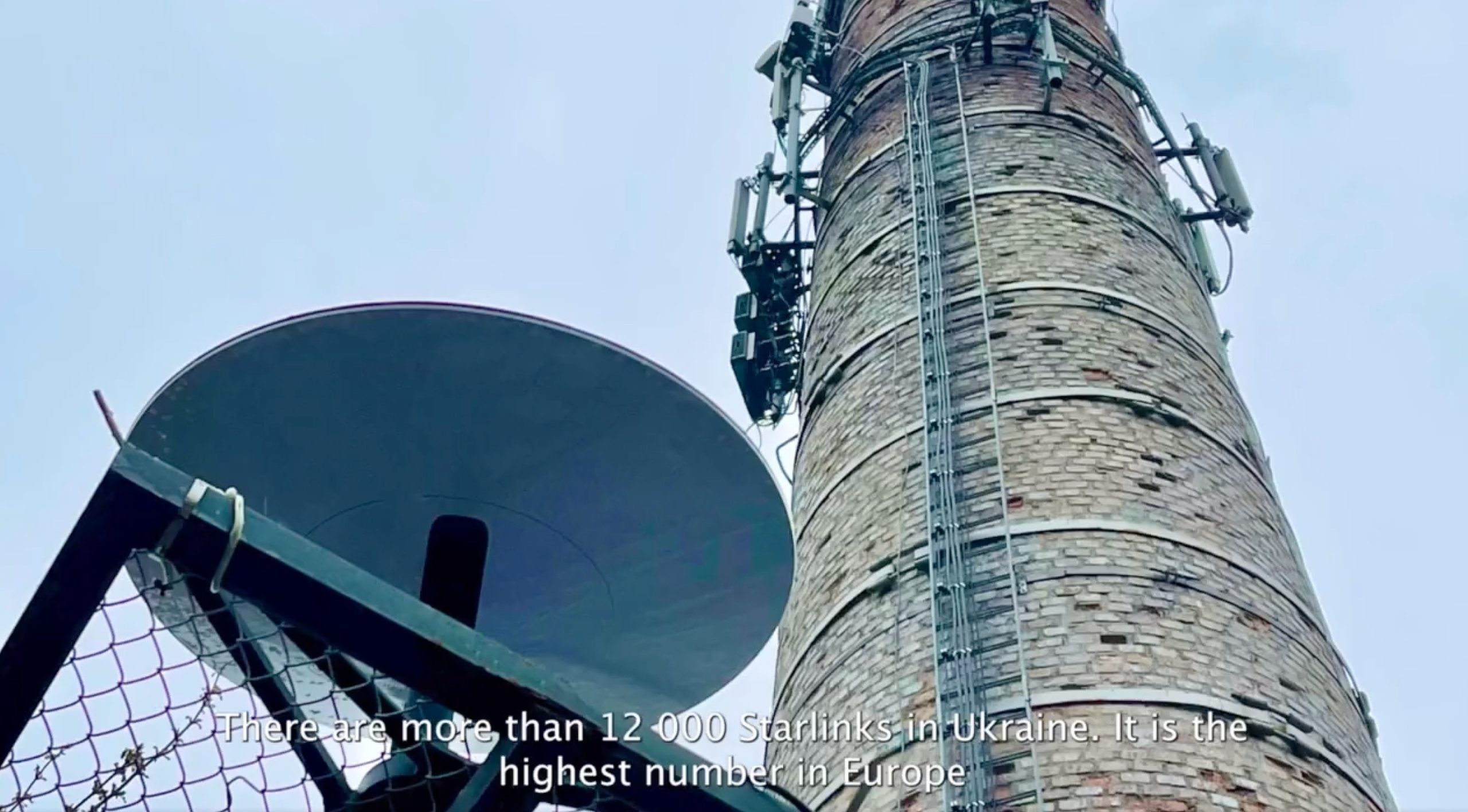
Ukrainian officials are accusing SpaceX of placing a speed limit on the military version of Starlink that their forces use to fly drones, but SpaceX has not confirmed that any change was made. Presidential adviser Serhiy Beskrestnov said in a Telegram post on Wednesday that Starshield terminals have begun losing service when they move faster than about 100 miles per hour, according to a Reuters report. “Our defense forces did not receive a warning about this limitation, and this led to the disruption of several missions,” he wrote.
Ukraine’s 7th Rapid Reaction Corps told Reuters that connections dropped for 10 to 20 seconds at just 68 to 75 mph, which made the drones harder to control. Volunteer Serhiy Sternenko, citing military reports, said the dropouts are now starting at 37 to 43 mph. These accounts come from Ukrainian officials and military sources and have not been independently verified. Regular civilian terminals were reportedly not affected, according to EUalive.
.@POTUS: We told Zelensky, ‘You can do whatever you want to Russia, but don’t hit the refineries because that’s a world problem.’ And what does he do? He goes and hits the diesel fuel. He better damn well stop. https://t.co/CdRlMcPlKr
— Rapid Response 47 (@RapidResponse47) October 10, 2026
SpaceX has not publicly commented or explained what, if anything, changed. Beskrestnov and other Ukrainian officials believe the issue is intentional and point to the timing. Washington has been pressing Kyiv to stop long range strikes on Russian oil refineries after President Trump called for an “energy ceasefire,” and Musk posted on Saturday that “Zelensky has gone too far.” EUalive noted that neither Ukrainian nor Polish officials have presented evidence that the limit was ordered by Washington or by SpaceX, so the link to politics remains an allegation. Other explanations, such as a technical or policy change affecting fast moving terminals, have not been ruled out.
Poland’s foreign minister, Radosław Sikorski, responded on X by quote tweeting a Kyiv Independent report and writing: “Hey, @elonmusk, big man, are you playing politics with your products again? As your European customers, we are watching you.” Poland is the largest funder of Ukraine’s Starlink service, having supplied more than 29,000 terminals and covering operating costs Sikorski has put at roughly $50 million a year. The wording echoes their 2025 clash, when Musk told Sikorski to “be quiet, small man.” At the time of writing, neither Musk nor SpaceX had responded to the claims.
Hey, @elonmusk, big man, are you playing politics with your products again?
As your European customers, we are watching you.— Radosław Sikorski 🇵🇱🇪🇺 (@sikorskiradek) October 14, 2026
The dispute sits on top of a long history. Musk confirmed in February 2022 that Starlink was active in Ukraine after a request from a Ukrainian minister. That October, SpaceX asked the Pentagon to share the bill and Musk said the cost was approaching $20 million a month, before he reversed course and said SpaceX would keep paying. In December 2024 the Pentagon moved some of those terminals onto the Starshield service, the government version now at the center of the complaints.
SpaceX has also changed how its network treats certain terminals in Ukraine before, and that time it was with Kyiv’s cooperation. In February, Ukrainian officials confirmed that terminals believed to be used by Russian troops were disabled after coordination with SpaceX, a step that Ukrainian commanders later said hurt Russian assaults. Whether anything similar is behind the latest reports is unclear, which is why Kyiv is asking for answers.
Ukraine is already looking at backups. Defense tech company Stetman is developing its own satellite system, UASAT-NANO, and officials in Europe have discussed alternatives to Starlink since early 2025, though none match its scale yet.
Elon Musk
FAA kicks off review of SpaceX’s bid to fly Starship nearly every day
FAA is reviewing SpaceX’s plan for 456 Starship launches a year, up from 25 today.
The FAA said Tuesday that it will prepare an environmental impact statement on SpaceX’s proposal to run as many as 456 Starship launches and 912 landings a year from Starbase, Texas. SpaceX is currently authorized for 25 launches and 50 landings annually, which makes the request roughly 18 times the existing ceiling. The notice of intent is set to publish in the Federal Register on Wednesday.
The plan comes in two phases. Phase 1 would allow up to 100 launches and 200 landings a year, on any day and at any hour. Phase 2, which the FAA says could arrive within several years, would raise the limit to the full 456 launches, still at any hour but only on weekdays. The agency noted that 912 landings is the upper limit for the Texas facility no matter where a given mission begins, and that Starship and Super Heavy could come down at the launch site or in the Gulf and open ocean.
A draft statement will be released for public comment at a later date, and the FAA has not said when. According to the Federal Registar, written comments are due November 30 on regulations.gov under docket FAA-2026-12808, with in person scoping meetings on November 17 in Brownsville and November 19 in Port Isabel, plus a virtual session on November 18. The review will weigh air quality, wildlife, coastal resources, water, noise, and aviation, and the FAA said any increase beyond this proposal would need its own separate review.
The numbers look large next to what Starbase has actually done. Starship has flown three times from Texas this year, including Flight 14 on September 28, the first orbital flight, which deployed 26 Starlink V3 satellites. Bloomberg reported that Starbase has never launched more than five times in a calendar year. The current cap of 25 comes from an FAA approval in May 2025. In February, the agency also approved up to 44 Starship launches a year from Launch Complex 39A in Florida, so Phase 1 in Texas alone would more than double that allowance.
Musk has said Starship could eventually fly more than once per hour within less than a decade, per Bloomberg. The nearer term target is Flight 15. Musk said on October 10 that it is hopefully four to six weeks away and will try to catch the ship with the tower, as Teslarati covered. That flight still runs under the existing 25 launch limit, and so would every Starbase launch for as long as the new review takes.
As of mid morning Pacific time on Tuesday, SpaceX had not posted about the filing on its own account.

Tesla opens the Q&A for its biggest earnings call yet

Ukraine says Starlink is cutting out its military drones as Poland calls out Elon Musk

FAA kicks off review of SpaceX’s bid to fly Starship nearly every day

The Pentagon taps Elon Musk to design the battlefield of the future

SpaceX reveals how its 1 Million AI satellite network will work and prevent space collisions


