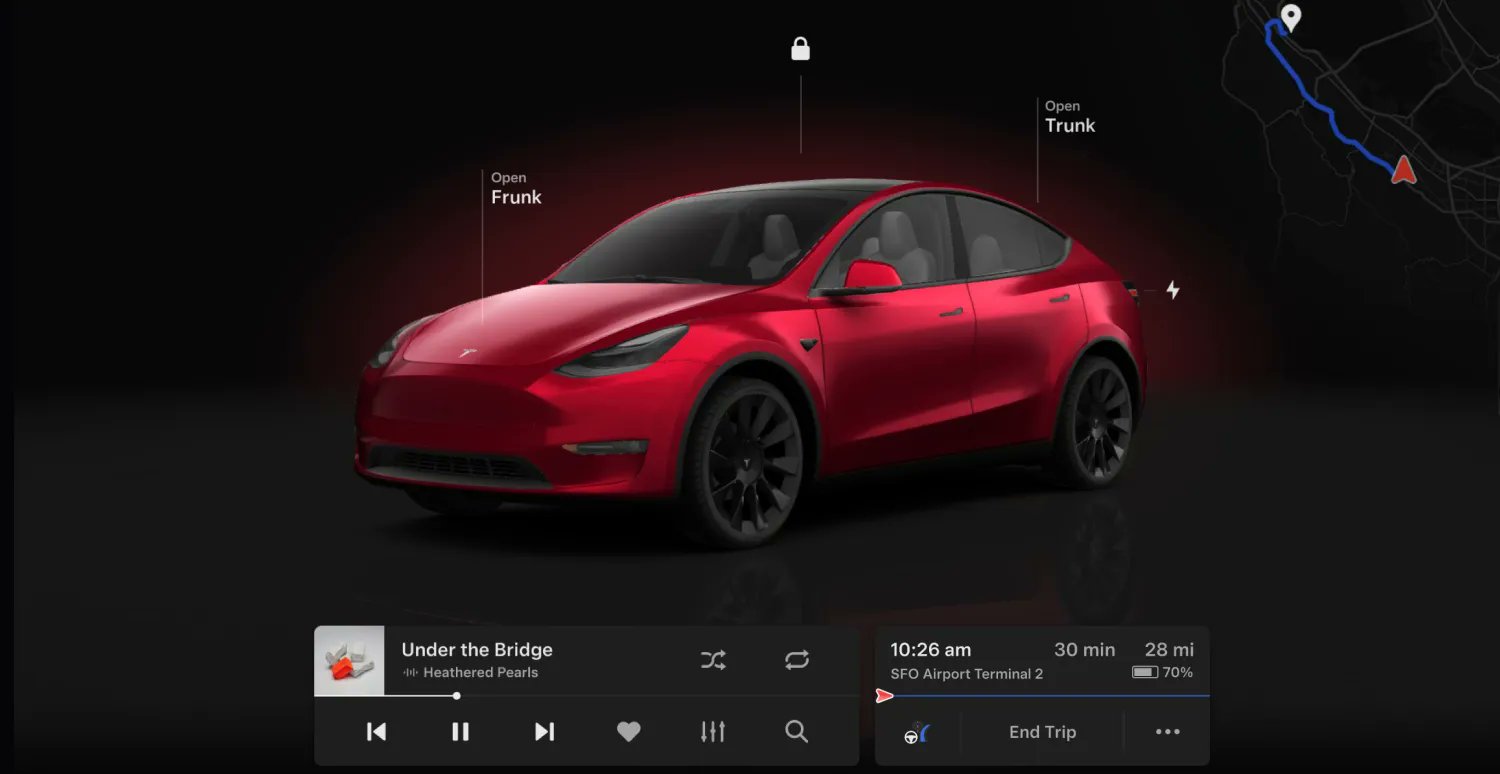

Tesla owners are reporting that they are now receiving update 2024.14.3, which is the 2024 Spring Release. The Spring Release includes user interface V12, Audible support, hands-free trunk, and sentry mode previews, among others. It also includes a number of new features for the Cybertruck.
Tesla previewed a number of the Spring Release’s updates in a post on X earlier this month. While Tesla did not indicate the exact release that would include the new features would be rolled out, the announcement was appreciated by electric vehicle owners nonetheless. Notable software updates, after all, are among the most unique parts of the Tesla ownership experience.
Your Tesla gets better while you sleep
Highlights from our upcoming Spring Release below
—
Visual updates (Model 3/Y with AMD chip)
– Immersive full-screen vehicle controls when parked
– Large playback controls & quick access to Recents, Favorites & Up Next in media player… pic.twitter.com/bwL53UhVUB— Tesla (@Tesla) April 16, 2024
As per Tesla software tracker Not A Tesla App, the Spring Release has started rolling out to customers. The Tesla software tracker also shared the release notes for the update, which could be found below. Interestingly enough, only AMD-based vehicles would be receiving some of the update’s new features, like the new V12 UI that’s similar to the Cybertruck.
Following are the release notes for software update 2024.14.3.
Visual Updates
User Interface v12 elevates your visual experience with the following updates:
- Immersive full-screen vehicle controls when you’re parked
- Large playback controls and quick access to Recents, Favorites, and Up Next in the media player
- Expandable Autopilot driving visualizations, with a smaller map in the top right for trip guidance
- A sleeker and more compact drive mode strip and refined driving readouts
Audible
Listen to thousands of Audible Originals, audiobooks, and podcasts. Pick up where you left off and listen seamlessly between your device and Tesla.
Scan the QR code to log in to your Audible account, or try it out with a selection of free audiobooks and podcasts. Requires Premium Connectivity.
Tesla update 2024.14.3 is now rolling out to customers!
This is the huge Spring update that includes the visual overhaul for AMD-based vehicles, Audible support and much more.
Check out the update below:https://t.co/EB1tFlFxxChttps://t.co/EB1tFlFxxC— Not a Tesla App (@NotATeslaApp) April 30, 2024
Hands-Free Trunk
Open your trunk even when your hands are full. Stand still behind your trunk with Phone Key unobstructed, listen for the chimes, and the trunk will open on its own.
To enable this feature, go to your vehicle settings > Locks > Hands-Free Trunk. Ensure your phone settings allow Nearby Interactions for the Tesla app, or open the app and go to Phone Key > Upgrade. Keep people and clothing clear of moving parts.
Requires iPhone 11+ and Tesla app 4.31.0+. A future update will extend this feature to Android users.
Preview of Sentry Mode Recordings
When Sentry Mode triggers your vehicle alarm and records an event, you can immediately preview a brief clip of the recording on your phone.
Press and hold the notification to watch the recording. In your vehicle settings, you must have Safety > Dashcam turned on.
Requires a USB with sufficient memory plugged into the vehicle, Tesla app 4.31.5+ on iPhone, and Premium Connectivity. Preview videos are end-to-end encrypted and can’t be accessed by Tesla.
Trip Progress Bar
Below the turn-by-turn list in your navigation, you’ll now see a progress bar that changes as you drive closer to your destination or next stop.
The progress bar also reflects live traffic conditions on your route if you have Online Routing turned on.
For real-time traffic and road conditions to appear on your routes, the setting at Navigation > Online Routing must be turned on. Requires Premium Connectivity.
Spotify Queue and Playback Speed
You can now sync your Spotify queue across vehicles and devices, and adjust playback speed.
Better Route Available
Navigation now shows you, at the top of your turn list, if a faster route becomes available. It will reroute unless you decline before the option expires.
To choose how often you see these suggestions, adjust the number of minutes saved.
In your vehicle settings, go to Navigation > Online Routing > Reroute to save. To use this feature, you must have Online Routing turned on.
Wiper Controls
Scroll Wheel — When you press the wipers button to view wiper controls, you can now adjust wiper speed by moving the left scroll wheel up or down.
Wipers Button — When you have the wipers set to I, II, III, or IIII, you can press the wipers button to cycle through speeds.
Other Updates
- When you’re parked, you can expand the browser to full screen.
- Access Car Wash Mode more quickly in vehicle settings > Controls.
- Rear passengers can now see the current trip details, time, and temperature at the top of the rear touchscreen, except when Entertainment apps are using the full screen.
- You can now swipe to delete Sentry Mode recordings in the Dashcam app on your vehicle touchscreen, or at Security > Sentry Mode Alarm Previews in the Tesla app 4.32.0+.
- When you have Valet Mode on, and your vehicle is unlocked or shifted out of Park, you’ll receive a notification on your phone.
- The Vampire Survivors game in Arcade now has the “Space 54” and “Deeploreble” updates.
- Arcade includes the latest game update for Polytopia “Path of the Ocean.”
- If you have no passengers in the back seat, the rear touchscreen now turns off when you shift out of Park, to reduce unnecessary energy use.
Speed Camera Chime
To hear a chime when you’re approaching a speed camera, turn on Navigation > Speed Camera Chime in your vehicle settings.
You must have Online Routing turned on. Requires Premium Connectivity.
Average Speed Zones
When driving through an average speed zone, you now see your average speed in the zone and the distance to the end of it.
You must have Navigation > Online Routing turned on. Requires Premium Connectivity.
Adaptive High Beams
High beams now adapt to reduce glare for other drivers and cyclists.
By detecting other road users, and selectively dimming individual pixels of the headlight, your high beams stay on more often for greater visibility at night.
To turn them on, in your vehicle settings go to Lights > Adaptive High Beams.
Beach Buggy Racing 2
Drive your own kart racer in an action-packed race to the finish. Careen through Egyptian pyramids, dragon-infested castles, pirate shipwrecks, and experimental alien bio-labs. Blast your opponents with an arsenal of fun and wacky Powerups.
When you play games, Cybertruck’s steer-by-wire system lets you turn the steering wheel without moving the tires.
To play, go to your vehicle settings > Entertainment > Arcade > Beach Buggy Racing 2.
Cabin Overheat Protection
For hot days or parking in direct sun, Cabin Overheat Protection helps maintain the temperature you set for up to 12 hours after you park. It will turn off at 20% battery to conserve range.
In your vehicle settings, go to Safety > Cabin Overheat Protection. Never leave children or pets unattended.
Customize Scroll Wheel Functions
Do more with the left scroll button on the steering wheel. You can perform actions like raise or lower ride height, open the glovebox, or save Dashcam footage, and adjust settings like brightness and drive mode.
Press and hold the left scroll button to open the menu and choose a function. Next time, the button will perform the most recent function you chose.
To choose a function any time you use this feature, go to vehicle settings > Display > Scroll Wheel Function, and choose Ask Each Time.
Cybertruck Colorizer
Customize how your Cybertruck appears on the touchscreen and Tesla app.
In your vehicle settings, go to ToyBox > Colorizer.
Improved Turning Circle
Your Cybertruck’s turning circle is improved by 1.6 feet, making parking and low-speed maneuvers easier. This is achieved by an increase in the turning angle of the front and rear wheels.
Front Passenger Air Vent
You can now open or close the front passenger air vent separately, with the rest of your vehicle Climate still on.
Tap the temperature to open Climate controls, touch the front passenger air wave on the touchscreen, and follow the instructions.
New Lock Sounds
You’ll hear new signature sounds from your Cybertruck when you lock and unlock.
You can enable or disable the sounds in your vehicle settings at Locks > Lock Confirmation Sound.
Zoom
Attend video calls with Zoom using the interior cabin camera.
Open the app directly, or join meetings from your Calendar. Shift to Park to use participant video and screen sharing. If you drive, then meetings switch to audio only.
Driver has sole responsibility to consult and comply with all local regulations while using Zoom. Requires Premium Connectivity.
Security Improvements
This update includes important security fixes and improvements.
Don’t hesitate to contact us with news tips. Just send a message to simon@teslarati.com to give us a heads up.


News
NASA taps SpaceX for more astronaut missions as Boeing Starliner remains grounded
NASA just gave SpaceX a $946 million contract for three more astronaut missions through 2030.

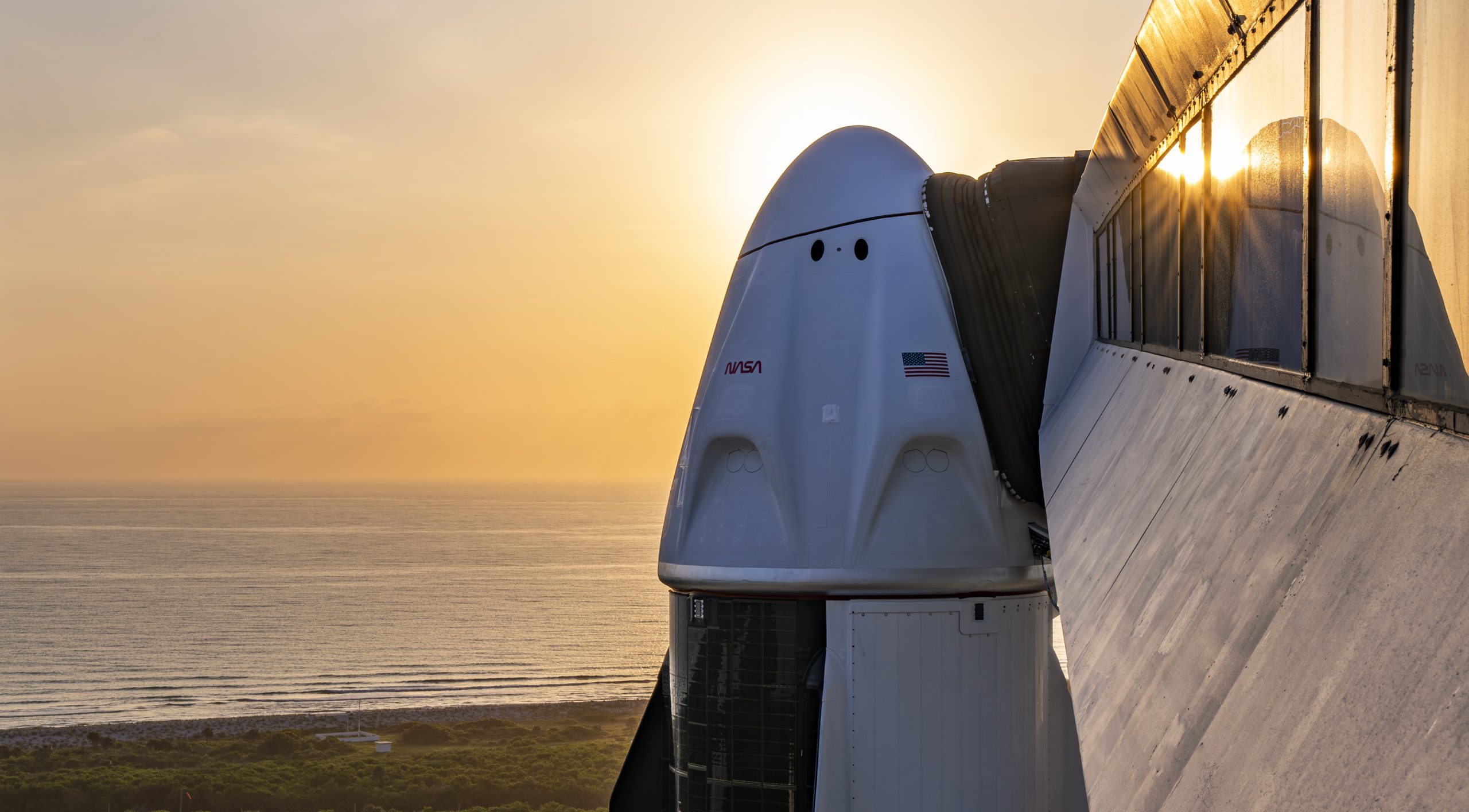
NASA has awarded SpaceX a $946 million contract modification covering three more astronaut missions to the International Space Station, according to an announcement the agency published Friday. The award adds Crew-15, Crew-16, and Crew-17 to SpaceX’s existing Commercial Crew Transportation Capability contract, bringing the agreement’s total value to $5.92 billion across 17 flights.
SpaceX confirmed the award on X, writing that it was excited for Falcon 9 and Dragon to launch NASA’s Crew-15, 16, and 17 missions to the Space Station from Florida. The new missions cover ground, launch, in orbit, and return operations, along with cargo transport and a lifeboat capability while docked at the station, and the period of performance runs through 2030.
We’re excited for Falcon 9 and Dragon to launch @NASA’s Crew-15, 16, and 17 missions to the @Space_Station from Florida https://t.co/Qm16vVK9F3 pic.twitter.com/drg3s7GtuM
— SpaceX (@SpaceX) September 18, 2026
The award follows a notice of intent NASA issued in May, when the agency first signaled it would purchase up to six additional post certification missions from SpaceX. Teslarati covered that filing at the time, noting NASA cited technical issues and schedule delays encountered by Boeing as a driving factor. Friday’s contract modification locks in three of those six missions, with the remaining three left open for NASA to award later, potentially to Boeing if Starliner clears certification.
Boeing’s CST-100 Starliner has still not flown an operational crew rotation mission for NASA. The spacecraft’s most recent crewed test flight in 2024 ended without the astronauts returning aboard Starliner, and the company has spent the time since working through thruster problems. SpaceX President Gwynne Shotwell said this week that SpaceX is not retiring Crew Dragon today, for sure, while stopping short of committing to fly it past 2030.
Crew-12 is currently docked at the space station, and NASA has said Crew-13 is targeting a launch in the coming weeks. The newly awarded Crew-15 through Crew-17 missions extend SpaceX’s role as NASA’s primary way of getting astronauts to and from orbit well into the back half of the decade, regardless of what happens with Starliner or Starship in the meantime.
Investor's Corner
New drone video shows Tesla’s Optimus Factory reaching a turning point
New drone footage shows Tesla’s dedicated Optimus factory steel frame nearing completion at Giga Texas.
Tesla’s dedicated Optimus factory at Gigafactory Texas is closing in on a finished steel frame, according to drone footage posted Thursday afternoon by longtime site observer Joe Tegtmeyer. In the video, Tegtmeyer said structural steel assembly is now about five column grids away from reaching the building’s north perimeter beam, putting the primary skeleton in its final stretch roughly six months after Tesla broke ground on the North Campus site in late March.
The Giga Texas Optimus Factory latest update … construction keeps moving fast!
Steel assembly is now only about 5 column grids from the north perimeter beam. Concrete is going in on the three upper floors, rebar is still being laid for more pours, and footing / grade-beam work… pic.twitter.com/qvFPvwnYzW
— Joe Tegtmeyer 🚀 🤠🛸😎 (@JoeTegtmeyer) September 17, 2026
Tegtmeyer’s footage shows concrete already going in on three upper floors while crews continue laying rebar and pouring grade beam footings at ground level. That kind of parallel work, steel rising at one end of the site while concrete sets at the other, is a scheduling approach Tesla used at the original Giga Texas building and appears to be repeating here to save time before the plant’s targeted 2027 production start.
Teslarati has tracked the building’s progress since Tesla confirmed construction was officially underway in May, when the first steel structure went up on what was then bare, reclaimed land. The facility is part of a more than 5.2 million square foot expansion of Giga Texas’s North Campus that Tesla has said will eventually run nearly the length of the existing vehicle factory, over 4,000 feet, while sitting somewhat narrower. Musk has pegged the long term output target at 10 million Optimus units a year once the line is running at full capacity, a volume that would dwarf the one million unit pilot line Tesla is standing up separately at its Fremont, California factory.
Tesla Giga Texas to feature massive Optimus V4 production line
The Texas facility sits alongside another major buildout on the same campus. Terafab, the joint Tesla and SpaceX chip fabrication plant that will eventually supply the silicon running Optimus units in the field. Housing robot assembly and chip production on the same grounds is a deliberate supply chain decision, cutting down on the shipping and lead time that would otherwise sit between the two.
Tesla has not given an updated timeline beyond its previously stated goal of bringing high volume Optimus production online at the site in the summer of 2027. Fremont’s smaller pilot line began mass producing the current Gen 3 robot in January, with that plant expected to build tens of thousands of units this year primarily to generate the real world data Tesla needs to refine the robot’s software before Giga Texas ramps up. Six months of visible construction progress, tracked almost entirely through Tegtmeyer’s recurring drone flights, gives the clearest outside look yet at how seriously Tesla is treating that 2027 deadline.
Investor's Corner
Tesla and SpaceX take “Terafab” Trademark fight to Federal Court
Tesla and SpaceX sue a small Illinois firm after cease and desist letters over Terafab.

Tesla and SpaceX are asking a federal judge to rule that their planned Terafab chip factory does not infringe a small Illinois company’s trademark, a request that arrives only after months of quiet negotiation broke down this summer.
The dispute traces to May 18, when Tesla filed three U.S. trademark applications for “Terafab” and “Tesla Terafab,” covering semiconductor chips and related chip making services. TERA-print LLC, a nanotechnology company that has held a federal trademark for “Tera-Fab” since 2021, responded five days later with a cease and desist letter. According to the lawsuit, first reported by Reuters, TERA-print argued that Tesla and SpaceX’s use of “Terafab” would confuse consumers familiar with its own trademark, which covers a desktop photolithography printer sold to researchers for sensor and bioengineering work.
What stands out in the filing is the timing of TERA-print’s own paperwork. One day before sending that cease and desist letter, on May 22, TERA-print applied to expand its existing registration to cover semiconductor materials, silicon chips, nanoelectronic devices and AI design services, categories it had not previously claimed. Tesla and SpaceX call that filing opportunistic in their complaint, noting it arrived two months after Tesla’s public Terafab announcement and just days after Tesla’s own trademark applications went in.
Elon Musk launches TERAFAB: The $25B Tesla-SpaceXAI chip factory that will rewire the AI industry
By June 10, TERA-print was threatening to sue for federal trademark infringement, false designation of origin and unfair competition, the complaint states. Rather than wait to be sued, Tesla, SpaceX and SpaceXAI met with TERA-print six separate times between June and August trying to resolve the dispute directly. Those talks collapsed, and the companies filed for declaratory judgment this week in the U.S. District Court for the Western District of Texas, asking a judge to find that “Terafab” does not infringe TERA-print’s mark before TERA-print can file a claim of its own.
TERA-print isn’t backing down. The company told PCMag it discussed a settlement with Tesla as recently as September 2 and feels misled by what it called Tesla’s professed interest in settling. Its CTO, Andrey Ivankin, said TERA-print holds a Defense Department contract to fabricate semiconductors and partially owns Mattiq Inc., an AI company built on TERA-print’s products, and that the company will vigorously defend its rights.
Tesla and SpaceX argue the overlap is superficial. Terafab is planned as a $16.8 billion complex spanning roughly 100 million square feet at the Grimes County site SpaceX confirmed last month, built to produce chips for Optimus robots, Tesla’s AI computing needs and SpaceX’s orbital data center ambitions, a scale and purpose the companies say no reasonable consumer would confuse with a tabletop lab printer. TERA-print’s product line has stayed focused on lithography tools for biological and sensor research since it registered its mark in 2021.
The trademark fight is the second legal dispute tied to the Terafab project in the past week, following a separate SpaceX suit aimed at keeping company records about the facility out of public view, as KBTX reported. Whether construction proceeds under the Terafab name now depends on a federal judge in Austin.

NASA taps SpaceX for more astronaut missions as Boeing Starliner remains grounded

New drone video shows Tesla’s Optimus Factory reaching a turning point


