Lifestyle
Deciding on Your Tesla Model X Configuration

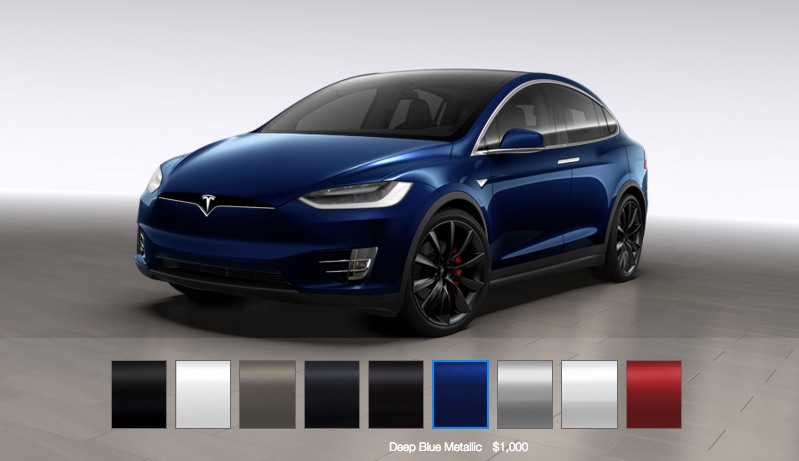
You placed a deposit on the Model X months if not years ago and the time to design and configure it has finally arrived. What’s that experience like? What are the available options and what will it cost me?
When I first considered buying a Tesla I wanted the Model X, but after Tesla kept postponing availability of the vehicle I decided to pull the trigger on getting a Model S. But despite being very satisfied and happy with my Model S, I still had that “I need a SUV” urge. Thus my $5,000 Model X deposit went in last year.
It hasn’t been an easy wait, mainly because I’ve been conflicted on what I will ultimately do with my beloved Model S. I’m sure my sentiments may resonate with some existing Model S owners or even those that are looking to enter the Tesla market for the first time, so here’s my thoughts around each of the Model X options (as I configure it through the Design Studio).
Model X Pricing
The base price of the Model X stripped down to its minimum features is $81,200. Depending on where you live, you may be eligible for Federal and State incentives that can add up to as much as $10,000 (here in the US) which can be backed out to an additional savings. That base price gets you the 5 seat configuration, falcon wing doors, all wheel drive, a 70 kWh battery, good for 220 miles of range, free access to the Tesla Supercharger network, and the list goes on.
There’s also optional features that can be added on at a later point in case you don’t want to spend the money upfront. The much talked about semi-autonomous driving capabilities such as auto self-parking, and the full suite of Autopilot capabilities is a good example of what could be purchased and enabled later on since every Model X already comes standard with the Autopilot hardware.
On the other hand, if you max out your Model X with all available options, you’re pushing close to $151,450 (at the time of this writing). That includes every feature and hardware option Tesla has to offer. So what are the $70,000 in options you can add?
Battery & Performance
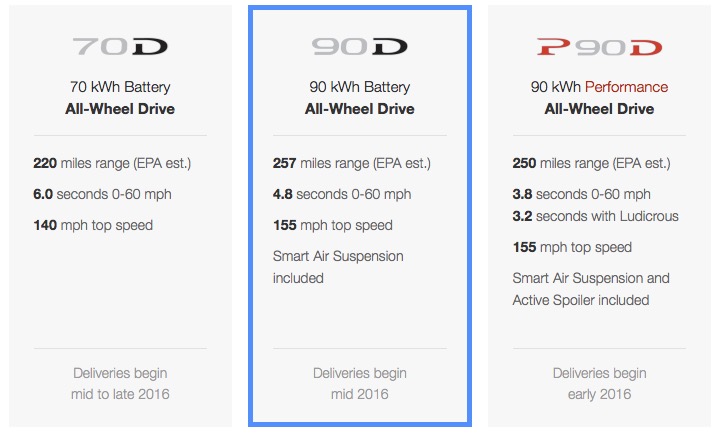
One of the greatest factors in determining cost will be your choice of battery size. That and whether you want enhanced performance. Your options are as follows:
- 70 kWh battery (70D)
- 90 kWh battery (90D)
- 90 kWh battery, Performance model (P90D)
The 70 kWh battery is what comes with the base price model. Choosing the 90 kWh battery adds $13,000 to the base price. Note that you must take the Smart Air Suspension (normally a $2,500 upgrade) when you opt for the larger battery. The 90 kWh battery increases EPA estimated range from 220 miles to 257 miles. This equates to 37 extra miles at a cost of $351 per mile of extra range.
What’s interesting when comparing this cost per mile to the Model S, upgrading the Model S from 85 kWh to 90 kWh will provide you with an extra 16 miles of range but at only $188 per mile of extra range. Adding range to the Model X seems much more costly than it is on the Model S.
If you go for the performance version of the Model X this increases cost by a whopping $20,000 on top of the 90 kWh pack upgrade, making for a total increase of $33,000 over the base model. Note that some options such as the Model X active spoiler are only available on the performance model.
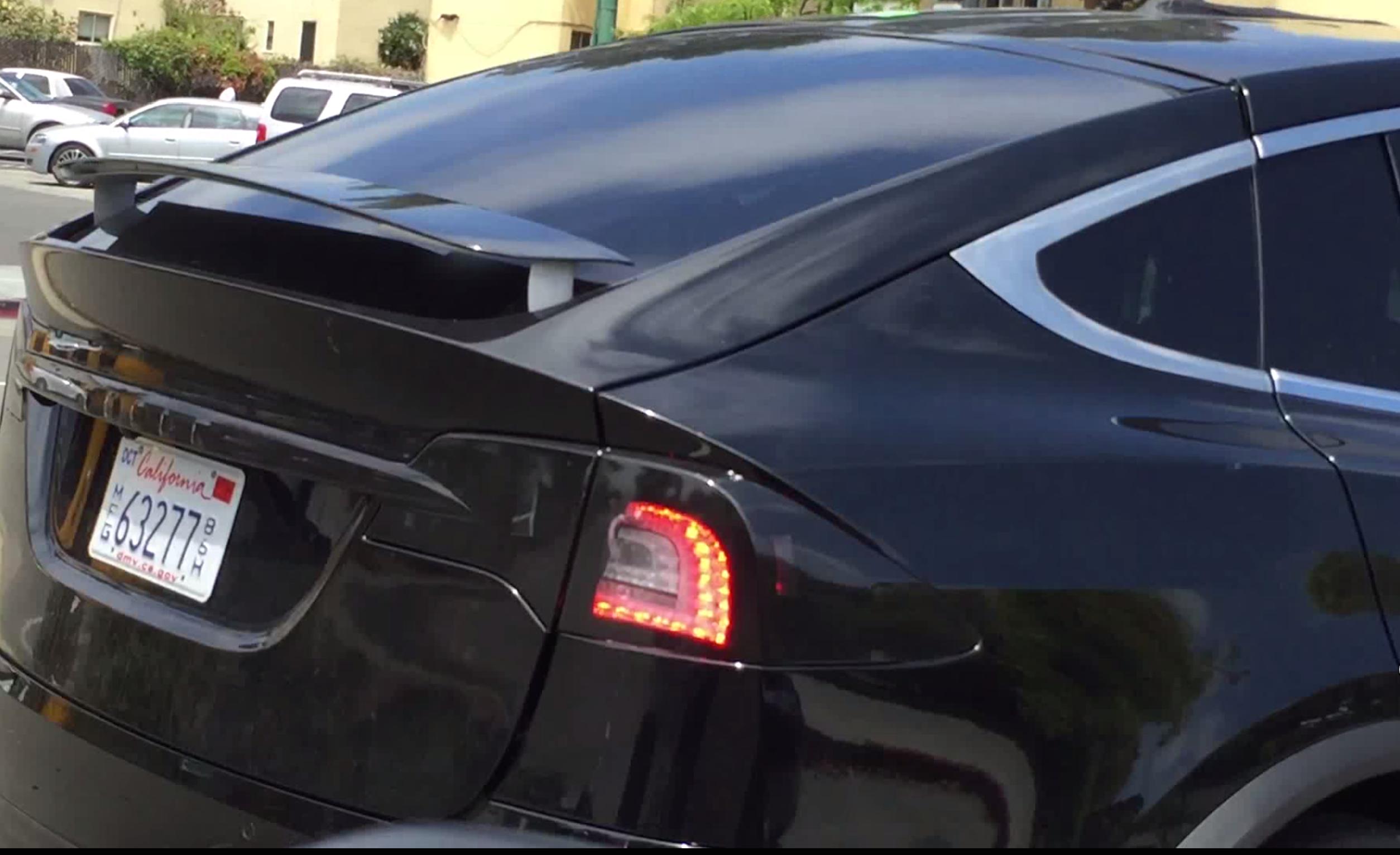
Model X Active Spoiler
While the 90D isn’t the performance model, it still goes from 0 to 60 mph in 4.8 seconds, roughly the same acceleration as a modern Porsche 911 Carrera. The Model X 70D goes from 0 to 60 mph in 6.0 seconds which isn’t shabby at all. The performance version of the 90D, the P90D will rocket you from 0 to 60 mph in 3.8 seconds, and further take you into super car territory of 3.2 seconds with the Ludicrous speed upgrade. Clearly, there’s a big decision to be made when it comes to picking your level of performance especially since there’s a drastic cost difference associated with each.
Tesla appears to be delivering the Model X based on the highest performing models (and most expensive) first, as indicated by the early 2016 delivery estimate in the Model X design configurator. 70Ds are estimated to be delivered mid to late 2016.
My choice would be the 90D. It has the most range and is closest to the range I have now on my Model S and it would also have the same level of performance.
Performance Extras
 If you’re a performance junkie and picked the P90D you have a few more choices you can make:
- Ludicrous speed upgrade – Improves performance for 0-60 from 3.8 seconds to 3.2 seconds. Adds $10,000.
- Active spoiler – improves highway range by 1.6% (thats 4 miles…). This is a “free” option, though at the derived price increase at $351 per mile of range added (outlined above), this feature really backs out to an additional cost of $1,400.
- Red brake calipers – this is purely an aesthetic item and it’s also a free option. Some love the look, some don’t.
If I did pick the P90D I’d take the spoiler and calipers but skip the Ludicrous upgrade. Its price is, well, ludicrous.
Seating
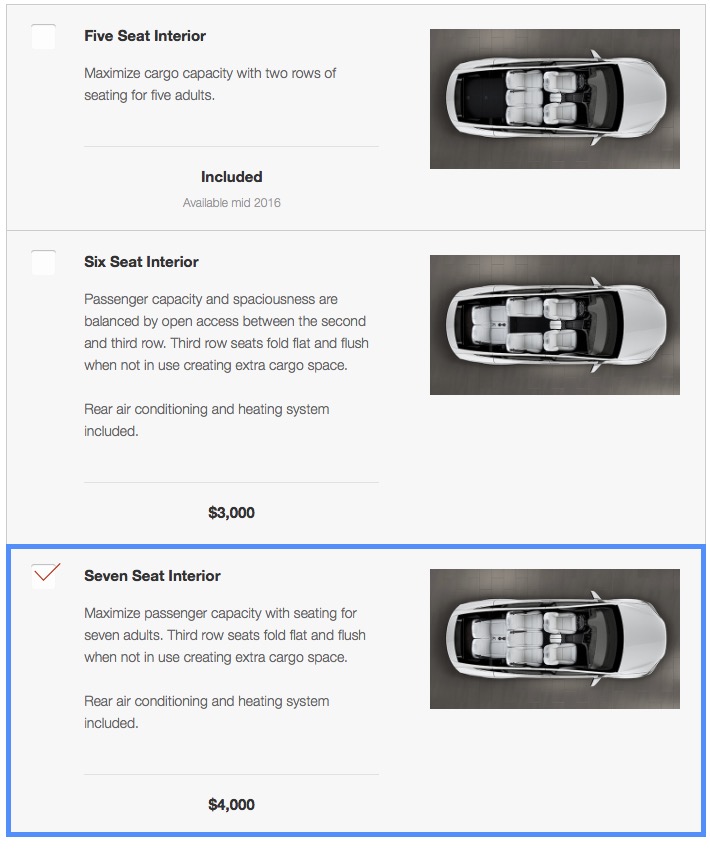 The next major choice to make is around the seating options. You can get the Model X with seating for 5, 6, or 7.
Seating for 5 is included in the base price. Seating for 6 adds $3,000 to the base price while seating for 7 adds $4,000 to the base price. The 5 seat configuration is also a lower build priority for Tesla so picking that could further delay your delivery.
The seat configuration and the way the seats tilt forward has been a very hot topic of discussion among Model X owners and enthusiasts. The second row seats do not fold flat but can be moved forward to make for more cargo room. The third row seats do fold flat.
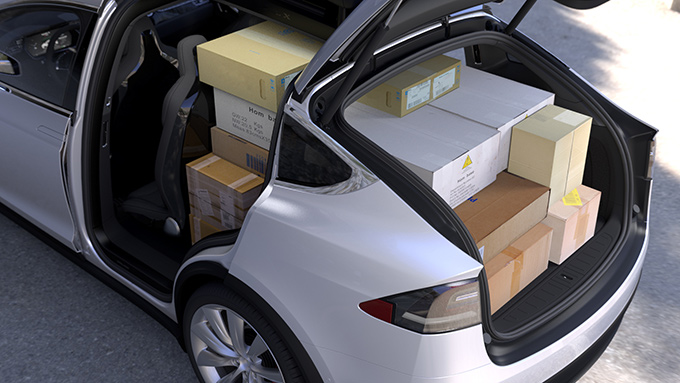
Your choice of seating arrangement will largely depend on your intended use of the Model X. The 6 seat configuration is popular as it allows you to walk through the middle of the second row seats to access the third row without having to move the seats or occupants.
For myself I was looking to replace the ability of my old Acura MDX which could seat 7. The main purpose of the Model X to me would be to be a people mover, so my choice would be the 7 seat option for an additional $4,000.
More Options
Next comes a series of major options. While all Model X’s have autopilot hardware, you need to pay extra for the feature to be enabled. This will cost $2,500 now, or $3,000 after you’ve taken delivery. This is a way to defer some cost if needed, but if you’re going to get it you’re better off paying for it upfront. I’d definitely be choosing this option!
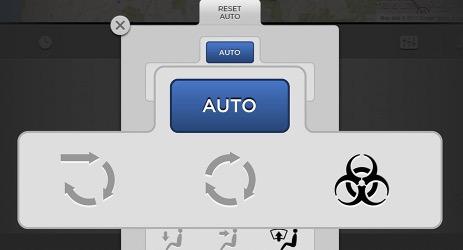 Another major choice to be made is around the Premium Upgrade package. This one is a tough decision for me. The package is expensive at $4,500 but has a bunch of cool features, though most of which I’d be fine without. Here’s the list:
- Self-presenting drivers door
- HEPA air filter (bioweapon defense mode)
- Two activated carbon air filters
- Ventilated front seats
- Leather in a few more places (arm rests etc)
- Alcantara headliner/upper dashboard
- Soft LED ambient lighting
- 3 position LED turning lights
- LED fog lights
Back when I ordered my Model S, the Premium Lighting Package was $1,000 and I struggled when trying to justify the value I would get for that price point. All I can say is that I purchased it and have loved it since. I really only care for a third of the features listed in the Model X Premium Upgrade package, so I’d love to see Tesla break this package up a bit.
Smart air suspension is an option at $2,500, but only for the 70D. The other two battery configurations include this feature. I’m not sure why Tesla chose to do this. I intentionally opted out of getting the Smart Air Suspension when I bought my Model S and have had no regrets doing so. To me this is another gimmicky feature that can lead to additional long term maintenance issues over time. I wouldn’t pick it if I had a choice, but the 90D forces me to take it.
Ultra high fidelity sound is the next major package for $2,500. This adds a bunch of speakers and XM radio capability (you still have to pay the subscription for XM). This is also another option that I don’t regret skipping when I first purchased my Model S. I’ve driven cars with and without upgraded sound systems and my ears can’t tell the difference. Perhaps it’s my country music taste 🙂
The Subzero weather package is another option. At $1,000, adding this feature is a no-brainer especially if you live in New England like I do. I have it on my Model S and get to use the features far too often. Like the package on the Model S, the Model X Subzero weather package will give you the option to heat all seats. On my MDX front and middle row seats had seat heaters but the third row occupants were left out — not so in the Model X!
Tow/Hitch options
The next two options are unique to the Model X. The first is the option to add a Towing Package for $750 which includes the hitch, the receiver, the wiring harness and software to handle it all. There’s a great video online demonstrating the Model X towing a boat using this upgrade.
![Signature Red Model X towing a 4,850 pound boat [Source: Max Kennedy via YouTube]](http://www.teslarati.com/wp-content/uploads/2016/01/Signature-Red-Model-X-Towing-Boat.jpg)
Signature Red Model X towing a 4,850 pound boat [Source: Max Kennedy via YouTube]
Getting the tow package really depends on what you plan on using the Model X for. When I bought my Acura MDX I added the towing package but ended up never using it even after 200k miles of ownership. I have other vehicles that are better for towing and once again I’d skip this upgrade.
For one, towing on an electric vehicle will drastically cut your driving range. There have been numerous discussions in the forums on how/if you can use Superchargers while towing. At the very minimum, you will need to disconnect/reconnect at Supercharger locations since the layouts generally don’t allow you to pull into the stall with a trailer attached. Also, you may not make it from one Supercharger to another with a heavy non-aerodynamic item in tow. Towing locally would probably be fine, but it doesn’t sound like road trips while towing large items are in the cards.
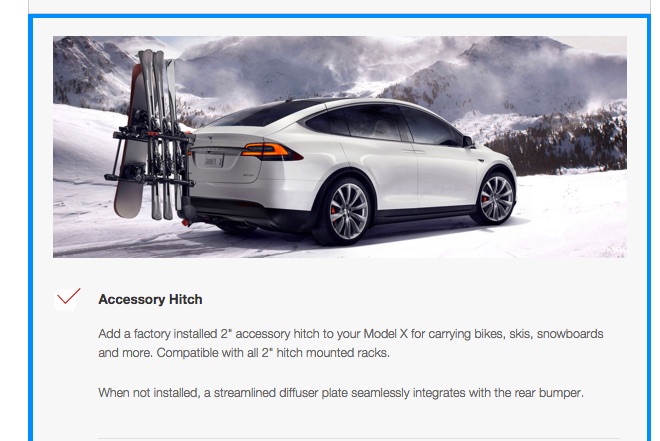
The beautiful and clever falcon wing doors have raised concerns for those that want to carry roof-mounted items such as skis, containers, and bikes. Tesla’s answer is as elegant as always. They include a free accessory hitch that lets you add a 2″ hitch mounted rack to the rear.
Final choices
My options selected during my Model X configuration has taken my price from a base of $81,200 to $112,200. The final choices to be made are around paint, wheels and interior.
For paint, your choices can add $0, $1,000, or $1,500 depending on what color you choose. I’d likely be in the $1,000 price range with the Titanium paint. My old “dolphin” grey is no longer available and the new grey is a bit too dark for me. Titanium wasn’t an option on my Model S back then and it looks fantastic in person.
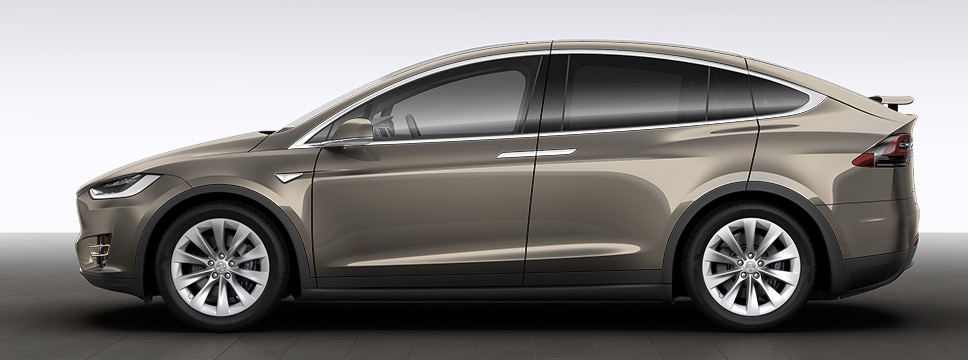
Wheels can also make quite a big impact on price. The base wheels add no cost, but you can pay an extra $2,500 or $4,500 to upgrade your wheels from the standard 20″ to 22″ in two types of finish.
Finally the interior choices. If you chose the Premium Upgrade Package then the seat choice is just a matter of preference and there is no additional cost. If you didn’t choose that package, seats can add another $2,500 to the cost.
The interior trim décor can cost anywhere from $0 to $1,000 extra based on your finish. The figured ash wood trim is a new option that adds $750, while the choice from my Model S – matte obeche wood – is the default and free option. There’s also a choice for a tan or black headliner. Both are free options. I’d go with the black headliner after learning first hand how many finger prints can end up on a tan headliner.
Even with my latest options, I’m still at a total price of $112,200 delivered.
One more thing
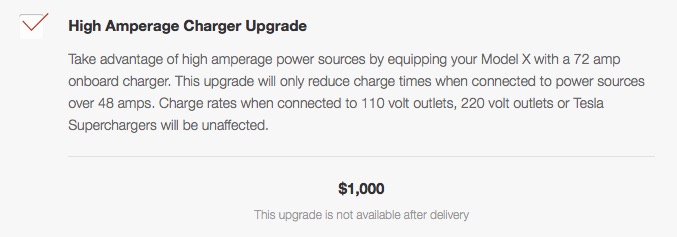
There’s one more hidden feature you can add. By default the Model X includes a 48 amp charger. If you type “charger” while configuring your Model X a hidden option appears for a 72 amp charger upgrade.
This is similar to the old “Dual Chargers” option on the earlier Model S’s. I opted for the dual charger configuration on my Model S and have gotten good use out of it. For that reason I’d add this option to the Model X for an additional $1,000.
Summary
My Model X would theoretically cost me $113,200 or $103,200 after tax credits.
Just for fun I configured a new Model S with similar options and the price came to $98,450, or $88,450 after tax credits. There are differences for sure — no falcon wing doors, a 85 kWh battery vs the 90 kWh battery, only seating for 5, etc.
The difference between my configuration of the Model X and the Model S is $14,750. To be fair, that gap narrows to $6,750 if I configure the Model X for 5 seats and the Model S with a 90 kWh battery, and leave both with the default charger configuration.
So, where do I go from here? That’s a good question and the subject of another post to come.
Related Topics


Elon Musk
How to use Grok Bot to block spam calls and texts
Musk told users to ask Grok Bot to scrub their phone numbers from spam lists.

Elon Musk has a new use case for Grok Bot, and it is the spam call. On Thursday he replied to an X user named Arash with a short instruction: “Ask your @Grok @Bot to remove your phone number from spam call & text lists!” Arash had said he got tired of the calls, had an AI bot find his number on listing sites and file removal requests, and packaged the process as a free skill for others.
The skill is called Spam-Call Scrubber, which is described to find a phone number on people search sites and data brokers, submits the opt outs, completes the confirmation emails those sites send back, and rechecks on a schedule the user picks. Using it requires the Grok Bot app. The pitch is time saved, since most broker opt outs sit behind separate forms on separate sites.
Ask your @Grok @Bot to remove your phone number from spam call & text lists!
— Elon Musk (@elonmusk) October 15, 2026
Musk said Grok Bot now gives each bot its own email address, and that it can detect scam emails. On Thursday he also said SpaceX would make users whole if the bot botches a purchase or leaks a card, then told users to shop away from Amazon after the retailer blocked the agent, as Teslarati reported. The terms of service we reviewed at the time put responsibility for what an agent does on the user.
For Tesla owners, Grok Bot is not just a phone app. Tesla brought Grok Bot into its vehicles on September 22, and we argued earlier this week that the Cybercab’s real advantage may be the errands it runs during a ride. Every Cybercab and the rest of the Model Y Robotaxi fleet has it enabled. The more routine tasks like this one become, the more a rider has reason to hand over something personal in the back seat.
The new Spam-Call Scrubber skill can be downloaded for free and works on sites that honor removal requests, while noting that listings can reappear, and illegal robocallers do not check any registry. Whether Spam-Call Scrubber cuts anyone’s call volume is something the first wave of users will find out, and Musk’s endorsement guarantees that wave is coming.
For a century, the car has asked the same thing of its owner, which is basically to pay attention. Even the best ride-hailing app like Uber or Lyft only moved the problem into someone else’s hands. You stopped driving, but you still sat in a stranger’s car, while half listening, and wondering whether to take a phone call in the car without being rude. The Cybercab has no wheel, no pedals and no driver. With Grok @bot now live inside it, it becomes something else entirely, and I think that matters more than the fleet count that everyone is tracking.
Grok @bot is an agent, not a voice assistant. A rider signs in once, and from then on can say what they need and watch it happen. Order dinner from a favorite restaurant. Fill the grocery cart. Move money, answer email, adjust a calendar, push a work project forward. Tesla engineer Yun-Ta Tsai confirmed it is enabled across every Cybercab and the rest of the Model Y fleet, and Tesla’s own pitch is that Full Self-Driving handles the commute while Grok handles the errands.
Think about what that does to a thirty minute ride. Uber sells you a trip, while Waymo sells you the same trip in a more private setting. Tesla is selling the thirty minutes themselves, returned to you with an assistant attached. Errands that used to eat a Saturday get done between pickup and drop off. The ride stops being dead time between two places and becomes a place of its own.
Tesla integrates Grok Bot into its vehicles for the ultimate personal assistant
Best of all, your Bots follow you into any Cybercab, and presumably your own Tesla, then logs you out automatically when you step out. Anyone can bolt a chatbot onto a screen, but much harder to own the vehicle, the autonomy stack and the assistant at once. It also quietly ties SpaceX’s Super Intelligence business to Tesla’s fleet, after Tesla converted its xAI stake into SpaceX equity. The relationship between those two companies is getting harder to describe as separate.
This is also where the hard questions start, because an agent that can spend your money in a vehicle other people also ride in needs some answers. How does it handle a voice it shouldn’t trust? What gets recorded, who can see it, and for how long? What happens when a rider leaves halfway through a task?
If Tesla gets those answers right, the scoreboard changes. We have been counting Cybercabs and wait times. The more telling number may be what riders accomplish per trip. That is data almost no one else will ever have, and it is the real reason to watch Grok @bot.
What do you think? Leave me a comment.
Lifestyle
Tesla’s mirrorless Cybercab will give riders a visibility upgrade
Tesla engineer confirms Cybercab update letting riders pull up rear and repeater cameras on demand.
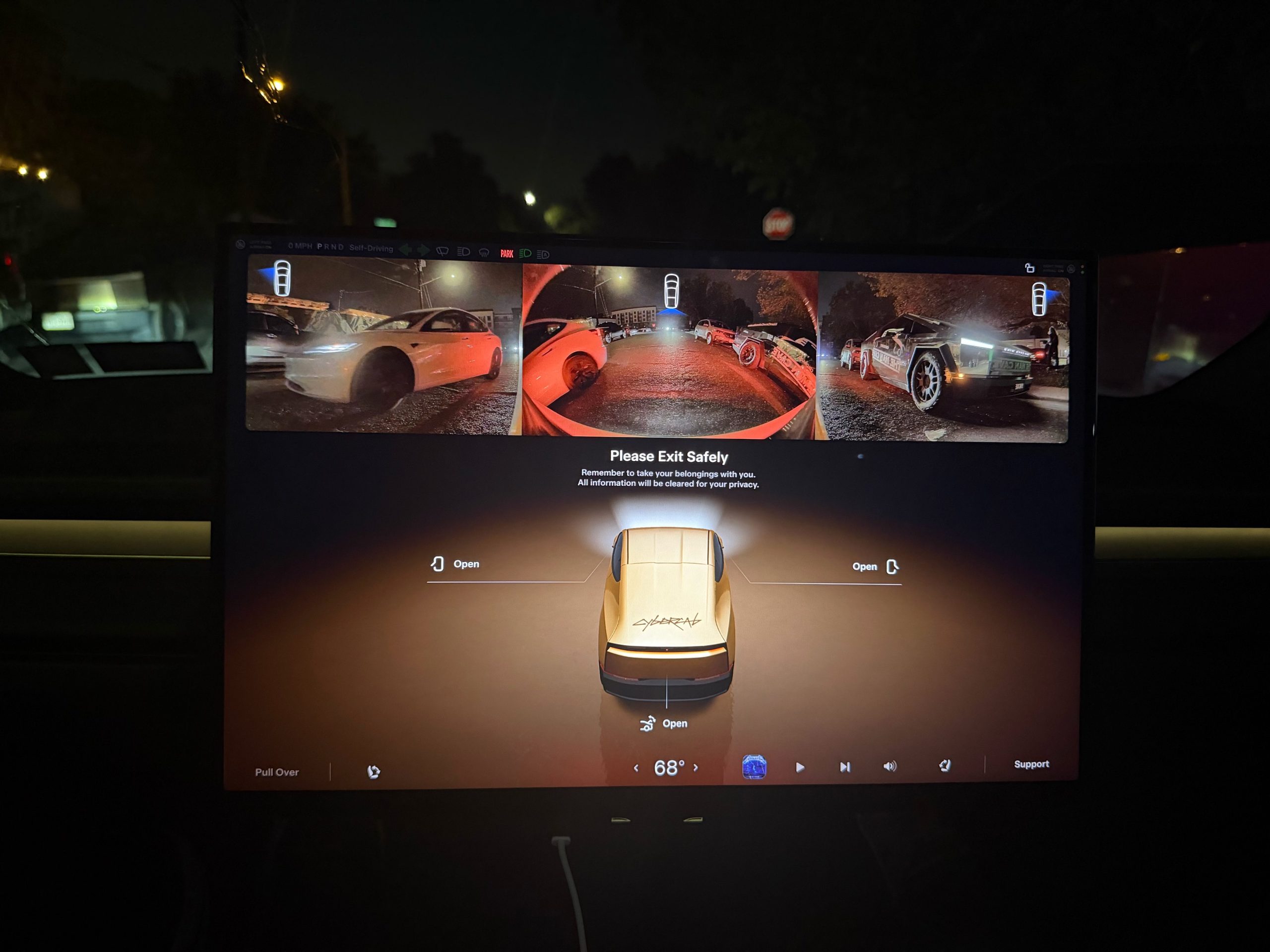
Tesla is working on a Cybercab update that would let passengers pull up the vehicle’s rear and side cameras on demand, and the request came straight from a rider.
The exchange played out on X late Friday. Cybercab rider Dan Burkland shared photos of the two-seater’s cabin screen after an evening ride, praised the UI team’s work, and left one request: let riders open the rear and repeater cameras whenever they want, “especially for peace of mind.” Tesla UI software engineer Evan (@CarCoder) answered with two words: “In development.”
The Tesla UI team absolutely crushed it with the infotainment software. Nicely done @CarCoder!
One feature request: Allow folks to pull up the rear & repeater cameras on demand. This would be great especially for peace of mind. https://t.co/mNAOSLx6pE
— Dan Burkland (@DBurkland) October 10, 2026
The idea fits a pattern Teslarati has tracked since public rides began. Days after paid Cybercab service opened in Austin, Tesla sent riders a survey that asked them to rate the touchscreen, the app and the cabin, and to pick the features they wanted most. We reported on that survey in September, and a camera view is the kind of small software change Tesla can push quickly if riders keep asking.
It also speaks to something unique about the vehicle. With no steering wheel, no pedals and no driver, passengers have no mirror to check and no way to see behind them. The hardware is clearly built for camera awareness, from the repeater cameras to the rear camera. Letting a passenger look through those same cameras would give a nervous first time rider a way to confirm what is around the car.
The timing matters because the fleet is growing fast. Tesla’s Robotaxi account said on Saturday that more than 300 Cybercabs are now serving Austin, an eightfold increase in 30 days, and Tesla AI chief Ashok Elluswamy named Dallas as the next city. More cars and more cities mean more people riding in a driverless vehicle for the first time, which is exactly when small trust features carry weight.
For now, the feature is confirmed only as in development. If Tesla follows its usual pattern with Cybercab software, riders could see it appear in a point release without any announcement, and Teslarati will watch for it.

Grok Bot users hit with weekly limits early, Elon Musk explains what happened

Tesla owners who tap Emergency Drive Away for fun are in for a surprise


